

The right gaming laptop depends on what you play: an RTX 4060 or RTX 5060 class machine with a 1080p or 1600p 144Hz+ screen covers Valorant, CS2, Fortnite and Apex with room to spare, while path-traced Cyberpunk 2077 at 1600p wants an RTX 5070 Ti or better with 12GB+ of video memory. We break down the GPU, processor, display, memory and storage choices that actually change your frame rate, then give our picks across five budgets and show you how to set a new machine up on day one.
What to buy for which games
Most people shop for a gaming laptop by brand or by price and only check the game requirements afterwards. We do it the other way around. Decide what you play most, then pick the GPU tier and screen that suit those games, and the rest of the spec sheet mostly falls into place.
| What you mostly play | GPU tier that fits | Screen we’d pair it with | Why |
|---|---|---|---|
| Valorant, League, CS2, Rocket League, Marvel Rivals | RTX 4050 / 4060 / 5050 / 5060 or Radeon RX 7600S | 1080p or 1600p, 144Hz to 240Hz IPS | These engines are CPU and refresh-rate bound, not GPU bound |
| Fortnite, Apex, Overwatch 2, Warzone | RTX 4060 / 5060 / 5070 | 1600p 165Hz to 240Hz | Battle royale maps are heavier and benefit from 8GB VRAM and DLSS |
| Cyberpunk 2077, Alan Wake 2, Black Myth: Wukong, Star Wars Outlaws | RTX 4080 / 5070 Ti / 5080 | 1600p 240Hz or OLED | Ray tracing and high textures need 12GB+ VRAM and 140W+ of power |
| Flight sims, Cities: Skylines II, Baldur’s Gate 3 at max | RTX 4090 / 5090 with 16GB+ VRAM, HX-class CPU | 1600p or 1800p mini-LED or OLED | Large asset streaming and CPU simulation load |
| Indie, emulation, strategy, old Steam library | Any current dedicated GPU, or a Ryzen AI 9 HX 370 with Radeon 890M integrated graphics | 1600p OLED, battery life prioritised | A dedicated card is nice but not required |
If your library is mostly lightweight titles and freeware games you picked up over the years, you can spend the saved money on a better display and a lighter chassis. If you chase ray tracing in single-player blockbusters, the GPU budget is where almost all your money should go.
GPU: the one spec that decides everything
A gaming laptop lives or dies on its dedicated graphics card. Everything else is a supporting act. Two things on the GPU line matter more than the name on the box: how much video memory it has and how much power the laptop maker lets it draw.
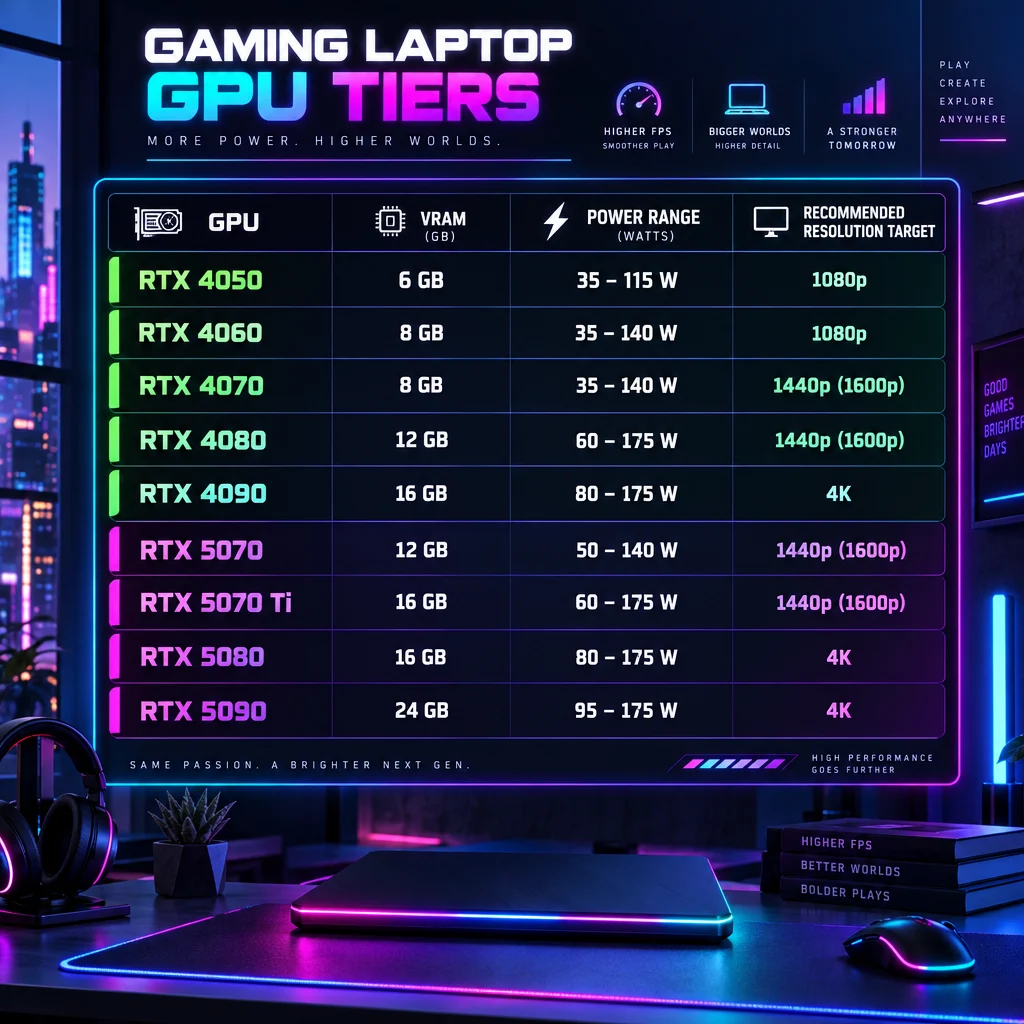
Current NVIDIA GeForce laptop GPUs
| Laptop GPU | Video memory | Power range (TGP incl. Dynamic Boost) | Realistic target |
|---|---|---|---|
| RTX 4050 | 6GB GDDR6 | 35W to 115W | 1080p esports and medium settings |
| RTX 4060 | 8GB GDDR6 | 35W to 115W | 1080p high, 1600p with DLSS |
| RTX 4070 | 8GB GDDR6 | 35W to 115W | 1600p high in most games |
| RTX 4080 | 12GB GDDR6 | 60W to 150W | 1600p ultra with ray tracing |
| RTX 4090 | 16GB GDDR6 | 80W to 150W | 1600p and 2160p ultra |
| RTX 5070 | 8GB GDDR7 | 50W to 100W | 1600p high with DLSS 4 |
| RTX 5070 Ti | 12GB GDDR7 | 60W to 115W | 1600p ultra, ray tracing on |
| RTX 5080 | 16GB GDDR7 | 80W to 150W | 1600p max, 2160p with DLSS |
| RTX 5090 | 24GB GDDR7 | 95W to 150W | Everything, including 4K external monitors |
The RTX 50 series laptops were announced at CES in January 2025 and reached shops from spring that year. They are still the current generation in late 2026; the only addition so far is a 12GB version of the RTX 5070 Laptop GPU, launched in April 2026. Their headline feature is DLSS 4 Multi Frame Generation, which can insert up to three AI-generated frames between rendered ones. The RTX 40 series gets single frame generation and the same upscaling model, so a well-powered RTX 4070 laptop remains a sensible buy if it is discounted against a 5070.
Why the power limit matters more than the model number
NVIDIA publishes a range, not a single wattage, for each laptop chip. Manufacturers then pick a point in that range to suit their chassis. That is why an RTX 4060 in a thin 14-inch machine at 65W can trail an RTX 4060 in a chunky 16-inch at 140W by a very noticeable margin. We have seen plenty of buyers pay for the higher model number and get a slower laptop than a cheaper, better-cooled one.
Before buying, find the TGP in the spec sheet or in reviews. Laptop makers like ASUS, Lenovo and MSI usually list it on the product page under the graphics card line, sometimes as “max TGP” or “with Dynamic Boost”. If a retailer listing omits it, treat that as a warning sign and search for the exact model number.
Analyst note
Two laptops with the same RTX 4070 can be separated by more than 100W of TGP (35W floor versus 140W ceiling with Dynamic Boost). We treat 100W as the minimum for a 4070 or 5070 class card if you plan to run 1600p at high settings.
MUX switch and Advanced Optimus
Hybrid graphics route the GPU’s output through the integrated graphics to save battery. That routing costs frames, often a meaningful percentage in esports titles. A MUX switch lets you connect the display straight to the dedicated card. NVIDIA Advanced Optimus does the switching automatically; a manual MUX requires a reboot but works everywhere. Nearly all recent machines from the major brands include one of the two, but budget models sometimes skip it, so check.
AMD Radeon laptop graphics
AMD’s RX 7600S, RX 7700S and RX 7900M appear in a handful of designs from ASUS, Alienware and Framework. They are good value when discounted, and FSR 3 frame generation works on them. Their ray tracing performance lags the equivalent GeForce part, and DLSS support in games is wider than FSR, so we only lean toward Radeon when the price gap is large.
Processor: HX versus H versus U
The CPU matters most in esports and simulation titles. At 1080p low settings in Valorant or CS2 the graphics card is barely working and the processor is the limiter. For single-player games at 1600p ultra the balance flips and almost any current eight-core chip is fine.
| CPU family | Example chips | Cores | Who it suits |
|---|---|---|---|
| Intel Core Ultra HX (Arrow Lake) | Core Ultra 9 275HX, Core Ultra 7 255HX | up to 24 (8P + 16E) | Top-tier current laptops, highest multi-core |
| Intel 14th Gen HX | Core i9-14900HX, Core i7-14700HX, Core i7-14650HX | 16 to 24 | Mainstream 2024 gaming machines, often discounted |
| Intel Core 13th Gen H | Core i7-13620H, Core i5-13420H | 8 to 10 | Budget laptops with RTX 4050 and 4060 |
| AMD Ryzen 9000 HX (Fire Range) | Ryzen 9 9955HX3D, Ryzen 9 9955HX | 16 | Esports frame rates, the 3D V-Cache part leads in CPU-bound games |
| AMD Ryzen AI 300 (Strix Point) | Ryzen AI 9 HX 370, Ryzen AI 7 350 | 12 or 8 | Thin 14-inch designs, strong battery life, Radeon 890M integrated graphics |
| AMD Ryzen 8040 (Hawk Point) | Ryzen 7 8845HS, Ryzen 9 8945HS | 8 | 2024 Zephyrus G14 and similar, still excellent |
Our rule: competitive players should look for an HX-series chip from either vendor; everyone else should buy the GPU and display first and accept whichever eight-core-plus CPU comes with it. The Ryzen 9 9955HX3D is the standout for 1080p esports because its stacked cache keeps frame times smooth in CPU-bound engines like Source 2.
Display: resolution, refresh rate and panel type
The screen is the part you look at for every minute of ownership and the second-largest driver of price after the graphics card. Three decisions here.
Resolution
Most 16-inch gaming laptops now ship at 2560×1600 (16:10, often called WQXGA or 1600p). Budget 15.6-inch models stay at 1920×1080. A few 14-inch and 16-inch OLED models use 2880×1800. We would not buy a 4K laptop panel for gaming; it burns GPU power for sharpness you cannot see at arm’s length and halves your frame rate compared with 1600p.
Match resolution to GPU tier. An RTX 4050 or 5050 belongs on a 1080p panel. An RTX 4060 or 5060 is the floor for 1600p with DLSS Quality enabled. From RTX 4070 and 5070 upward, 1600p native is the natural home.
Refresh rate
Competitive players need 144Hz at a minimum. We prefer 165Hz to 240Hz, and 240Hz has become standard on the Legion Pro 7i, ROG Strix Scar and Razer Blade lines. The frame rate your GPU produces needs to roughly match that number to benefit, which is why pairing a 240Hz panel with an RTX 4050 makes little sense for anything heavier than League of Legends. Variable refresh (G-SYNC or FreeSync) smooths the gap between frame rate and refresh and is worth having.
Panel type
| Panel | Strengths | Weaknesses | Best for |
|---|---|---|---|
| IPS | Cheap, bright enough, 240Hz+ options, no burn-in | Weaker contrast, some blooming on dark scenes | Esports, budget buyers |
| OLED | Perfect blacks, near-instant pixel response, vivid colour | Lower peak brightness for SDR, burn-in risk with static HUDs | Single-player games, movies, content work |
| Mini-LED | Very high brightness, good HDR, no burn-in | Blooming halos around bright objects, pricey | HDR gaming, bright rooms |
Pixel response matters for shooters. A 240Hz IPS panel on a flagship machine is sharper in motion than a 165Hz OLED on paper would suggest, but OLED’s response time is so low that a 240Hz OLED, like the one on the 2025 Razer Blade 16, is currently the best of both worlds. If you play with persistent HUD elements for eight hours a day, IPS or mini-LED avoids the burn-in question entirely.
System memory and storage

RAM
16GB of DDR5 is still the minimum for a gaming laptop in 2026. Memory has become expensive, though: laptop DDR5 modules cost about six times more in September 2026 than in July 2025, so a model that already ships with 32GB is worth more than it used to be against upgrading later. Several games already recommend 16GB and a Discord call, a browser with twenty tabs and a game launcher can push total usage past 12GB. 32GB is the comfortable target for anyone who streams, edits or runs heavy mods.
Check whether the memory is socketed (two SODIMM slots) or soldered. Most 16-inch and 18-inch machines use slots and can be upgraded later; many thin 14-inch designs, including the Zephyrus G14 and Razer Blade 14, solder LPDDR5X for speed and thinness, so buy the capacity you will want in three years. DDR5-5600 is the common speed; faster kits make a measurable difference only in CPU-bound esports titles.
Storage
Game installs have ballooned. Call of Duty with Warzone can exceed 100GB. Baldur’s Gate 3 is around 150GB. A 512GB drive is full after four large titles plus Windows, so 1TB is our floor and 2TB is the sensible choice if the price difference is under about $100. Look for PCIe 4.0 NVMe and a second M.2 slot for later expansion; most 16-inch models from Lenovo, ASUS and MSI include one. Load times between a good PCIe 4.0 drive and a PCIe 5.0 drive are not noticeably different in games, so do not pay extra for Gen 5.
Wireless, ports, battery and Windows
Wi-Fi 6E (adds the 6GHz band) is the baseline we accept, and Wi-Fi 7 (802.11be) is appearing on newer models. For ranked play, a 2.5Gbps Ethernet port still beats any wireless standard on latency consistency. Most 16-inch gaming laptops keep an Ethernet jack; thin designs drop it, so plan on a USB-C adapter.
For ports, look for at least one Thunderbolt 4 or USB4 connector (40Gbps, drives external monitors and docks), HDMI 2.1 for a 4K 120Hz TV, and a full-size SD reader if you create content. An SD slot is one of the first things premium machines cut, oddly.
Battery life in gaming laptops is poor when gaming and fine for everything else. Expect one to two hours gaming unplugged at reduced performance, and six to ten hours of browsing on the newer Ryzen AI and Core Ultra chips. The battery size is capped at 99.9Wh by airline rules, so flagship machines all cluster at 90Wh to 99Wh.
Every laptop here ships with Windows 11 Home. You do not need Pro for gaming. Expect to spend ten minutes removing trial antivirus and vendor bloat on first boot.
Our picks by budget
These are the models we would point a friend toward in each price band. Prices move weekly with deals, so treat the bands as rough and check current pricing on the manufacturer site and two large retailers before buying. The memory shortage has pushed laptop prices up through 2026: MSI told investors to expect increases of 15 to 30 percent, and XMG raised most models by $113 to $228, so expect today’s prices at the top of each band or above it.
| Pick | Configuration to look for | Screen | Rough price band | Best for |
|---|---|---|---|---|
| Acer Nitro V 15 | Core i5-13420H or i7-13620H, RTX 4050 or 4060, 16GB, 512GB to 1TB | 15.6″ 1080p 144Hz or 165Hz IPS | Under $1,000 | Esports on a tight budget |
| Lenovo Legion 5i (Gen 9 / Gen 10) | Core i7-14650HX or Core i7-14700HX, RTX 4060 / 4070 / 5070, 16GB to 32GB, 1TB | 16″ 1600p 165Hz or 240Hz IPS | $1,200 to $1,700 | Best value all-rounder |
| ASUS ROG Zephyrus G14 (2024 / 2025) | Ryzen 9 8945HS or Ryzen AI 9 HX 370, RTX 4060 / 4070 / 5070 Ti, 16GB to 32GB, 1TB | 14″ 2880×1800 120Hz OLED | $1,500 to $2,300 | Portable, premium build |
| Lenovo Legion Pro 7i (Gen 10) | Core Ultra 9 275HX, RTX 5080 or 5090, 32GB, 1TB to 2TB | 16″ 1600p 240Hz IPS | $2,500 to $3,800 | High-end performance per dollar |
| ASUS ROG Strix Scar 18 (2025) | Core Ultra 9 275HX, RTX 5080 or 5090, 32GB to 64GB, 2TB | 18″ 1600p 240Hz mini-LED | $3,000+ | Desktop replacement |
Acer Nitro V 15: the budget floor
The Nitro V 15 is the laptop we recommend when the budget is firm and the games are Valorant, League, Fortnite and Minecraft. Buy the RTX 4060 version if it is within $150 of the 4050, because 8GB of VRAM against 6GB extends its life by a couple of years. The 1080p panel matches the GPU, the chassis is plastic but easy to open for a RAM or SSD upgrade, and the Core i5-13420H is enough for esports at 144 frames per second. Fan noise is the trade-off.
Lenovo Legion 5i: the value all-rounder
Lenovo’s Legion 5i hits the specification we consider the sweet spot: a 16-inch 2560×1600 panel at 165Hz or 240Hz, an HX-class Intel processor, and an RTX 4060, 4070 or 5070 with a full power budget. Lenovo’s cooling runs these cards near the top of their TGP range, which is why a Legion 4070 often matches a thin-and-light 4080. The keyboard is one of the best on any gaming laptop. The Gen 9 models with 14th Gen Intel chips and RTX 40 cards are frequently discounted now that Gen 10 is out, and that discount is usually the better deal.
ASUS ROG Zephyrus G14: portable and premium
The G14 is a 14-inch, roughly 1.5kg aluminium laptop with a 2880×1800 120Hz OLED panel that is still the best display in its size class. Its RTX 4060 or 4070 runs at a lower power limit than a Legion, so raw frame rates are lower, but both the Ryzen 9 8945HS model and the Ryzen AI 9 HX 370 model deliver real battery life for a gaming machine. Memory is soldered, so order 32GB. Buy this if the laptop goes to class or on planes every week.
Lenovo Legion Pro 7i: high-end without the Razer tax
The Legion Pro 7i Gen 10 pairs the Core Ultra 9 275HX with an RTX 5080 or 5090 at 150W and a 16-inch 1600p 240Hz display. It is loud under load and thick enough to hold a full keyboard with a numpad, and that extra space is why it sustains higher clocks than slimmer rivals. If you compare it against a Razer Blade 16 or an Alienware 16 Area-51 with the same GPU, the Legion is typically several hundred dollars cheaper for a similar or faster result. The Razer wins on display and finish; the Legion wins on price per frame.
ASUS ROG Strix Scar 18: the desktop replacement
At 18 inches with a 1600p 240Hz mini-LED panel and the top Core Ultra 9 and RTX 5090 pairing, the Scar 18 replaces a tower for people who cannot keep one. Its tool-free bottom panel, two SODIMM slots and two M.2 slots make upgrades easy. The MSI Titan 18 HX is the alternative in this class with a mechanical keyboard and a 4K mini-LED screen, but we find the Scar’s 1600p 240Hz display the more sensible gaming choice because 4K at 18 inches wastes GPU power.
Matching the laptop to specific games
Here is how the big titles behave on laptop hardware and what competitive players set them to.
Valorant
Riot’s minimum spec is an Intel Core 2 Duo E8400 with Intel HD 4000 graphics, which tells you how light the engine is. The constraint is the CPU and the refresh rate. Pros run 1920×1080 with almost everything on low, shadows off and anti-aliasing at MSAA 2x or 4x for clean edges. Any RTX 4050 laptop paired with a 165Hz or 240Hz panel is overkill in the best way. If you grind ranked toward Immortal or Radiant, prioritise the HX processor and the refresh rate over the graphics card.
Counter-Strike 2
CS2 is heavier than CS:GO was and far more sensitive to CPU and memory speed. Valve asks for a four-core processor, 8GB of RAM and a DirectX 11 card with 1GB of VRAM at minimum, but a steady 240 frames per second on competitive maps needs an HX chip and DDR5. Many pros still run 1280×960 stretched to 4:3 on a 1080p panel; on a 1600p screen use 1920×1200 or 1280×800 stretched. The Ryzen 9 9955HX3D is the CPU to buy if CS2 is your main game.
Fortnite
Epic recommends a GTX 960 class card and 16GB of RAM, which an RTX 4060 laptop exceeds comfortably. Competitive players use Performance mode (the simplified renderer) or DirectX 12 with low settings and a frame cap at the panel refresh. Fortnite’s UE5 Nanite and Lumen settings in the full renderer are where an RTX 4070 or 5070 earns its keep, if you prefer the look. The Chapter and season patches that land roughly every three months tend to raise the floor, so leave headroom.
Apex Legends, Overwatch 2 and Marvel Rivals
Apex scales well and an RTX 4060 holds 144 frames per second at 1080p medium. Overwatch 2 is easy on the GPU and its 600 frames per second cap means CPU is the limit. Marvel Rivals is a UE5 title and the heaviest of the three; it is the one where DLSS upscaling on a 1600p panel becomes mandatory on an RTX 4060 or 5060.
Cyberpunk 2077, Alan Wake 2 and other ray-traced single-player games
These are the games that justify an RTX 4080, 5070 Ti or better. Cyberpunk’s path tracing mode at 1600p is playable on an RTX 5070 Ti only with DLSS Performance and frame generation on, and it is smooth on an RTX 5080 or 5090. With 8GB cards the first thing to turn down is texture quality, because video memory, not raw speed, is the wall. Buy 12GB or more of VRAM if these are your games.
Simulation and strategy
Microsoft Flight Simulator 2024, Cities: Skylines II and large Total War battles are CPU and memory heavy. The 24-core Core Ultra 9 275HX and 32GB of RAM matter more than moving from an RTX 5070 Ti to a 5080. A 2TB drive is also near-mandatory for MSFS’s streamed assets.
Light games and older libraries
If you mostly play indie titles, emulated classics or browser experiments like Scratch games, an integrated Radeon 890M in a Ryzen AI 9 HX 370 thin laptop will run them, and you gain battery life and weight savings in exchange. We still prefer a dedicated card in anything marketed as a gaming laptop, because game requirements only move in one direction.
Day-one setup: settings to change before you play
A new gaming laptop ships in a balanced power mode with hybrid graphics on and the display set to 60Hz in some cases. Ten minutes of setup can be worth a lot of frames.
Quick steps: set up a new gaming laptop
- Update Windows 11 fully, then install the vendor app (Lenovo Legion Space, ASUS Armoury Crate, MSI Center, Acer NitroSense, Alienware Command Center).
- Install the NVIDIA app and the latest Game Ready driver, or AMD Adrenalin for Radeon.
- In the vendor app, set the performance mode to Performance or Turbo when plugged in and enable the discrete GPU or MUX mode.
- In Windows, open Settings, System, Display, Advanced display and set the refresh rate to the panel maximum.
- In Settings, System, Power, set Power mode to Best performance for the plugged-in profile.
- In the NVIDIA app, set Low Latency Mode to On and leave Vertical sync off; enable G-SYNC in the display settings if the panel supports it.
- Uninstall trial antivirus, McAfee or Norton bundles and unused OEM software.
- Run one benchmark (Cyberpunk’s built-in benchmark or 3DMark Time Spy) and note the result so you can spot throttling later.
Settings worth knowing by category
| Category | Setting | Our value | Why |
|---|---|---|---|
| Windows | Game Mode (Settings, Gaming, Game Mode) | On | Suppresses background updates during play |
| Windows | Hardware-accelerated GPU scheduling (Display, Graphics, Default graphics settings) | On | Small latency improvement on RTX 40 and 50 |
| Windows | Refresh rate | Panel maximum | Default is sometimes 60Hz on first boot |
| NVIDIA app | Low Latency Mode | On (Ultra for esports) | Cuts render queue, reduces input lag |
| NVIDIA app | Power management mode | Prefer maximum performance | Stops clocks dropping between loads |
| NVIDIA app | Vertical sync | Off (use G-SYNC) | Tearing fixed by VRR without input lag |
| Vendor app | GPU mode | Discrete / dGPU only / MUX on | Bypasses integrated graphics, removes the Optimus penalty |
| Vendor app | Fan profile | Performance or Turbo plugged in | Higher TGP sustains boost clocks |
| In game | Frame cap | Refresh rate minus a few frames | Keeps VRR engaged, reduces stutter |
| In game | DLSS | Quality at 1600p, Balanced at 1800p | Near-native image, large frame gain |
Keep it cool
Thermals decide sustained performance more than any setting. Raise the rear of the laptop by a centimetre, keep it off the bed, and repaste or clean the fans after about two years. Laptop power bricks are matched to TGP, so always game on the supplied brick; a 100W USB-C charger will not let an RTX 5080 reach its 150W limit and most machines will throttle the GPU hard on anything less than the original adapter.
Gaming laptop versus gaming PC
A tower of the same price is faster, quieter and easier to upgrade. That is the whole case for a gaming PC and it is a strong one. A desktop RTX 5070 is roughly a laptop RTX 5080 in performance because it runs at 250W rather than 150W, and GPU names are not comparable across the two.
The laptop’s advantages are exactly what you would expect: one box, a built-in display, and it goes to a friend’s house, a LAN or a dorm. Our honest guidance is that if the machine will spend its life on the same desk, a desktop plus a cheap ultrabook usually beats a flagship laptop for the same spend. If it needs to move even once a week, buy the laptop and do not look back.
One middle path: a gaming laptop docked to a 1440p 240Hz external monitor over HDMI 2.1 or USB-C. You keep portability, gain a better screen and keyboard at home, and the external output on a MUX-equipped machine bypasses the integrated graphics automatically.
Where to buy and how to avoid getting scammed
The safest sources are the manufacturer store (Lenovo, ASUS, Dell, HP, Acer, MSI, Razer) and large retailers with a clear returns policy. Manufacturer outlet and refurbished stores are an underrated source: a refurbished Legion with a one-year warranty often beats the price of a new budget machine with a worse screen.
Timing matters. Prices drop in the weeks after a new generation ships (spring for new GPUs), during back-to-school in August, and in the November sales window. Discounted previous-generation RTX 40 models can still be the value play because the RTX 50 laptops command a premium and the frame rate gap at the same tier is modest outside of Multi Frame Generation.
Stay safe
Any “unlocked” or “below cost” gaming laptop offered through Discord DMs, Telegram or a marketplace listing with stock photos is a scam almost every time. Never pay by crypto, gift card or friends-and-family transfer, and never accept a laptop without booting it to Windows and checking the GPU in Task Manager before money changes hands in person.
If you hang out in a Discord server for hardware deals, treat every unsolicited seller as a scammer and stick to the public deals channel moderated by the server. Server owners who run hardware communities should lock DMs for new members with the Server Settings, Safety Setup, DM and Spam Protection options and require verification before members can post links. That protects the people who join from precisely this trade.
A second scam targets sellers: fake payment-received emails and “pay for shipping insurance” requests. If you are selling an old laptop to fund a new one, use a platform with buyer and seller protection and ship only after funds clear.
Mistakes we see most often
Buying a 4K panel on a mid-range GPU. Sharpness you cannot see at 16 inches and half the frame rate.
Paying for a higher GPU tier in a thin chassis instead of a lower tier at full power. Check TGP every time.
Choosing 512GB of storage. You will be deleting games within a month.
Ignoring the keyboard and trackpad. A machine you type on daily deserves ten minutes in a shop or a careful reading of reviews.
Forgetting the power brick. Flagship bricks weigh close to a kilogram and change the “portable” calculation.
Skipping the warranty check. Accidental damage cover from the manufacturer is worth it on a $2,500 laptop that travels.
FAQ
Is a gaming laptop worth it compared to a desktop?
Yes if it needs to move, no if it never leaves a desk. Desktops are faster per dollar and easier to upgrade, but a laptop with an RTX 5070 or better runs every current game well and fits in a bag.
How much RAM does a gaming laptop need?
16GB of DDR5 is still the minimum in 2026 and 32GB is the comfortable choice for streaming, modding or heavy multitasking. Check whether the memory is socketed before assuming you can upgrade later; many 14-inch models solder it.
Which GPU should I get for Valorant, CS2 and Fortnite?
An RTX 4060, 5060 or even a 4050 is plenty for these games at 1080p low settings. Spend on an HX-class processor and a 165Hz to 240Hz screen instead, because those games are limited by the CPU and refresh rate rather than the graphics card.
Is an RTX 4070 laptop still a good buy now that RTX 50 exists?
Yes, if it is discounted and runs at 100W or more. The 40 series lacks Multi Frame Generation but shares the DLSS 4 upscaling model, and raw performance per tier moved modestly between generations.
OLED or IPS for a gaming laptop?
OLED for single-player games and media, IPS or mini-LED for esports with static HUDs for many hours a day and for the brightest rooms. A 240Hz OLED is the best of both if the budget stretches that far.
Does screen size matter for performance?
Indirectly. Larger 16-inch and 18-inch chassis fit bigger coolers and run the same GPU at higher power than 14-inch designs, which is why a Legion Pro 7i or Strix Scar outruns a Zephyrus G14 with the same graphics card name.
How long does a gaming laptop last?
Plan on four to five years of playing new releases at reduced settings from an RTX 4070 or 5070 class machine, and two to three years at high settings. A battery replacement around year three and a repaste around year two keep it running at its original pace.
About this article

Written by Joseph Smith
Joseph Smith is a digital nomad born in the 90s who grew up on PlayStation platformers and Halo 2 multiplayer. He plays Counter-Strike and Dota 2 competitively and started Toopics to bring gamers closer together, especially through Discord. More about Joseph
- Published · Updated