
The best Scratch platformers start with griffpatch’s Appel, the most-viewed original game from Scratch’s most-followed creator at about 15.6 million views. Next come his physics climber Getting Over It and his fast action game Epic Ninja. For rhythm platforming, play -GeometricalCoder-‘s Geometry Dash 2.2 Platformer Mode. firstject’s Lightcube Platformer is the best atmospheric single-player pick, and griffpatch’s cloud platformers are the easiest way to play with friends. Every game below is a live project on scratch.mit.edu, and each entry lists its creator, sub-genre, controls, difficulty and rough length.
Key takeaways
- griffpatch made 8 of the 10 picks. Four of his games have more than 12 million views each (roam.gg, November 4, 2026).
- Each pick has a sub-genre tag (precision, rage, rhythm, cloud multiplayer), so you can choose one that fits your mood.
- For smoother play, open the project ID on TurboWarp. Try interpolation first, and only use 60 FPS if the game was built for it.
- If you want to build your own, start with griffpatch’s Classic Platformer series and then move on to Tile Scrolling Platformer.
- View counts differ between sources and change over time, so this guide gives the date each figure was checked.
Fact-checked
We checked these key facts against the sources named, on November 20, 2026:
- For rhythm platforming, CrystalKeeper7’s Geometry Dash Subzero and Meltdown ports are the best picks, and griffpatch’s cloud platformers are the easiest way to play with friends (source: pockettactics.com)
- Geometry Dash Subzero by CrystalKeeper7: rhythm auto-runner. CrystalKeeper7’s Subzero port is the best-known way to play RobTop’s Geometry Dash spin-off on Scratch. Pocket Tactics names it as a standout Scratch port (source: pockettactics.com)
The best Scratch platformers at a glance (November 2026)
Appel by griffpatch is the best overall. Epic Ninja suits players who want speed, and Getting Over It is the hardest test of patience. Geometry Dash 2.2 Platformer Mode is the rhythm pick, and Cloud Platformer Multiplayer Fun is the one to play with friends. Younger players should start with Scratchnapped or Snail Platformer.
The difficulty ratings are editorial. They’re based on each game’s genre and mechanics and on how Scratch and fan coverage describe it. Length is a rough band, because how long a platformer takes depends mostly on your skill.
| Rank | Game | Creator (Scratch username) | Sub-genre | Difficulty | Rough length | Multiplayer? |
|---|---|---|---|---|---|---|
| 1 | Appel | griffpatch | Precision / speedrun | Medium-hard | Long, replayable | Online times |
| 2 | Getting Over It | griffpatch | Rage / physics climb | Very hard | Open-ended | No |
| 3 | Epic Ninja | griffpatch | Action platformer | Medium-hard | Medium | No |
| 4 | Geometry Dash 2.2 Platformer Mode | -GeometricalCoder- | Rhythm / platformer hybrid | Medium | Short | No |
| 5 | Lightcube Platformer | firstject | Single-player cave platformer | Medium | One cave, start to exit | No |
| 6 | Scratchnapped (A Scratchnapped Adventure) | griffpatch | Side-scrolling adventure | Easy-medium | Short | No |
| 7 | Snail Platformer | griffpatch | Compact single-player | Easy-medium | Short | No |
| 8 | Cloud Platformer Multiplayer Fun | griffpatch | Cloud multiplayer | Easy | Session-based | Yes (cloud) |
| 9 | Massive Multiplayer Platformer | griffpatch | Cloud multiplayer | Easy | Session-based | Yes (cloud) |
| 10 | Paper Minecraft | griffpatch | Sandbox with platforming | Easy | Open-ended | Varies by version |
The list leans heavily toward one creator, and that reflects the site fairly. JetLearn’s July 2024 snapshot of Scratch statistics counted about 164 million shared projects. Of all that work, griffpatch’s engines are the ones other creators most often learn from, remix and copy. scratchviews.com’s 2026 snapshot puts his projects at about 250 million views and 2.8 million loves combined.
Did you know?
Four of the most-viewed Scratch games are by one person. roam.gg’s November 4, 2026 list puts griffpatch’s Paper Minecraft at about 67M views, Getting Over It at 22.7M, Appel at 15.6M and Epic Ninja at 12.2M.
How these picks were ranked
This ranking puts game feel ahead of popularity. Popularity still counts, but old hits keep collecting views, so a game with huge numbers can play worse than a newer one. These are the criteria, roughly in order of weight:
- Control feel (highest weight). Does the jump respond on the frame you press the key? Can you control how high you jump? Do acceleration and stopping behave predictably?
- Collision quality. You shouldn’t sink into floors, snag on wall corners or see jitter when the camera scrolls. This is where most Scratch platformers fail.
- Level design and readability. You should be able to see what kills you and understand why you died.
- Originality. The game needs at least one mechanic or idea of its own, beyond a reskin of a common engine. Faithful recreations such as the Geometry Dash fan games are judged on how accurate and polished they are.
- Polish. Menus, checkpoints, sound, and a way to restart without reloading the page.
- Popularity, with dates. Views and loves come from named sources, each with the date it was checked.
- Still live. Every pick needs a public project page that loads. Games that no longer load are left out of the ranking (see the Geometry Dash section below).
Why popularity numbers don’t match
Several sites track Scratch numbers, and each one takes its snapshot on a different day. Fan sites also tend to round up. These figures for the same games show how far apart they can be:
| Game | Figure | Source | Date |
|---|---|---|---|
| Paper Minecraft | About 67M views | roam.gg most-viewed list | Checked Nov 4, 2026 |
| Getting Over It | 22.7M views | roam.gg | Checked Nov 4, 2026 |
| Appel | 15.6M views | roam.gg | Checked Nov 4, 2026 |
| Appel | 10,000,000+ views, 200,000+ loves | appel.lol fan site (unofficial) | 2026 |
| Appel | 139,180 hearts | CodeWizardsHQ “25 best Scratch games” guide | Around mid-2025 |
| Epic Ninja | 12.2M views | roam.gg | Checked Nov 4, 2026 |
| Geometry Dash (NormanTheGamer) | Over 2.6M views | Scratch project page | Checked Nov 20, 2026 |
| Geometry Dash 2.2 Platformer Mode | Over 1.5M views | Scratch project page | Checked Nov 20, 2026 |
| Lightcube Platformer | Over 850,000 views | Scratch project page | Checked Nov 20, 2026 |
| All griffpatch projects | About 250M views, 2.8M loves | scratchviews.com | 2026 snapshot |
Look at the trend rather than any single number. Appel’s loves rose from about 139,000 in an older guide to “200,000+” on its fan site, so the game is still gaining players years after its release.
The best Scratch platformers, ranked
Each entry covers what the game is, why it made the list, its controls, difficulty and rough length, and who it suits. To open any of them in TurboWarp, take the number at the end of the project’s Scratch address and add it after turbowarp.org/. The TurboWarp section below explains this in more detail.
1. Appel by griffpatch: the gold standard
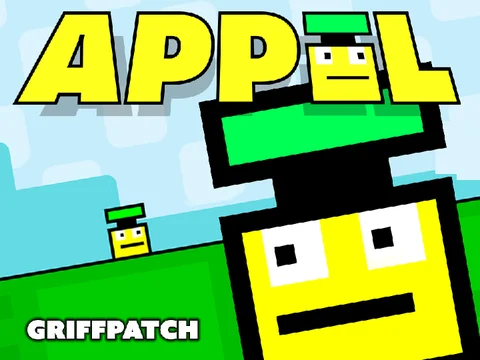
Appel is the best platformer on Scratch, and other creators use it as their benchmark. You play as an apple and race through levels designed for speed and precision. The levels are timed, so it works as a casual platformer and as a speedrun game.
- Type: Precision / speedrun platformer
- Controls: Keyboard. Arrow keys or WASD to move and jump, the same as griffpatch’s other platformers. The Instructions panel on the project page lists the controls for the current version.
- Difficulty: Medium-hard. Early levels teach the movement, and later ones expect clean inputs.
- Rough length: Long. Clearing the levels is only the start, because you’ll keep playing to cut your times.
- Standout: The movement. Acceleration, jump arcs and collision all feel deliberately tuned rather than left at default values, which is why so many people copy it. The appel.lol fan site says Appel has more than 25,000 remixes.
- Who it suits: Players who want one game to master, and Discord servers looking for a shared speedrun target.
The honest downside is that Appel’s polish can make other Scratch games feel rough by comparison. Newcomers sometimes find the later levels a sharp jump in difficulty. If you do, play Scratchnapped first and come back to Appel.
2. Getting Over It by griffpatch: physics rage platformer
This is griffpatch’s recreation of Bennett Foddy’s well-known climbing game, and with 22.7 million views it’s his most-viewed platformer (roam.gg, November 4, 2026). There’s no walking or jumping. You swing a hammer with the mouse to drag a man in a cauldron up a mountain of junk, and one bad swing can drop you a long way.
- Type: Rage / physics climbing platformer (a recreation, not an original)
- Controls: Mouse only. The hammer follows your cursor.
- Difficulty: Very hard. Losing progress is the core of the design.
- Rough length: Open-ended. It depends entirely on how often you fall.
- Standout: Mouse-driven physics inside Scratch, an engine that was never built for it.
- Who it suits: Patient players, streamers, and anyone who enjoys a game made to frustrate them.
Because you play it with the mouse, it feels very different from the keyboard games on this list. Dragging a finger on a touchscreen is a poor substitute, so use a mouse or trackpad.
3. Epic Ninja by griffpatch: action platforming
Epic Ninja is griffpatch’s fast action platformer, with 12.2 million views (roam.gg, November 4, 2026). It’s built around momentum and quick reactions, and it sits between Appel’s precision and an arcade action game.
- Type: Action platformer
- Controls: Keyboard movement and jump. The project pages for recent versions list the full key layout (v1.12 appears in many users’ favorites).
- Difficulty: Medium-hard
- Rough length: Medium
- Standout: Speed. Few Scratch platformers stay this easy to read while moving this fast.
- Who it suits: Players who find pure precision games slow and want more movement.
4. Geometry Dash 2.2 Platformer Mode by -GeometricalCoder-: rhythm meets platformer
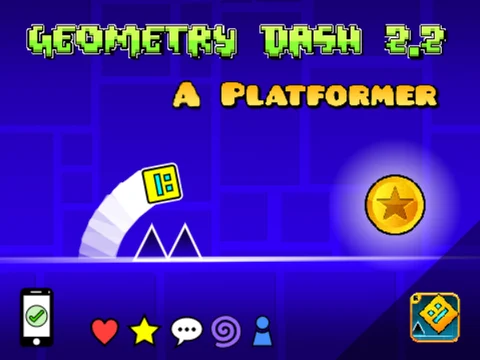
This project recreates the platformer mode from Geometry Dash update 2.2. You move left and right yourself instead of auto-running, and it’s the best Geometry Dash-style game on Scratch right now. RobTop Games released update 2.2 on December 19, 2023. -GeometricalCoder- first made this Scratch version in January 2024, and it now has more than 1.5 million views.
- Type: Rhythm / platformer hybrid (a fan recreation; the project credits the art to RobTop Games)
- Controls: Keyboard. You move left and right and jump, as in the official 2.2 platformer mode. The Instructions panel lists the exact keys.
- Difficulty: Medium
- Rough length: Short
- Standout: The tile scrolling is built on griffpatch’s tutorials, so it combines Geometry Dash’s look and feel with a proven Scratch scrolling engine. That makes it worth opening in the editor once you’ve finished playing.
- Who it suits: Geometry Dash fans who want more control than an auto-runner gives them.
If you’re new to the real game, our Geometry Dash guide for new players has early-level tips that also work in Scratch recreations.
5. Lightcube Platformer by firstject: a cube in the dark
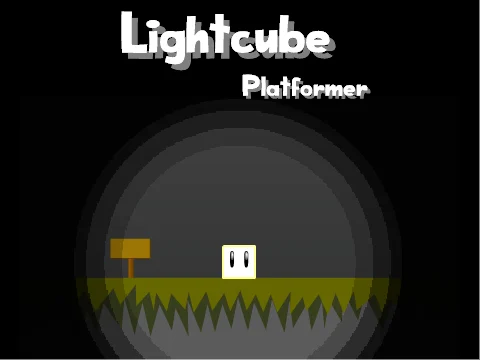
Lightcube Platformer is the strongest non-griffpatch original on this list. You play a glowing cube that lights its own way through a dark cave while you search for the exit. firstject first made it in December 2016, and Scratch featured it that same month. It has more than 850,000 views and was still being updated in 2026.
- Type: Single-player cave platformer
- Controls: Keyboard. The project’s Instructions panel lists the keys.
- Difficulty: Medium
- Rough length: One cave, from the start to the exit
- Standout: The lighting is the main mechanic. You only see the part of the cave your cube lights up, so you have to read the level as you go. Most Scratch platformers show the whole screen.
- Who it suits: Players who want an original idea instead of another engine reskin.
6. Scratchnapped by griffpatch: Mario-style adventure
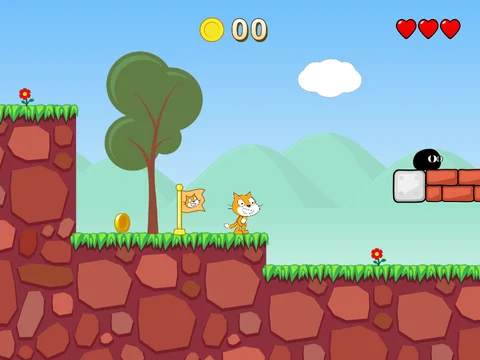
Scratchnapped is griffpatch’s side-scrolling adventure, and it’s the closest Scratch gets to a classic Super Mario Bros. game. The Scratch Projects Wiki says you play as Scratchy, who sets out to rescue the Scratchlings after Uncle Bitnap kidnaps them. griffpatch’s profile lists a version called Scratchnapped Adventure v0.2.7.
- Type: Side-scrolling adventure platformer
- Controls: Keyboard movement and jump
- Difficulty: Easy-medium
- Rough length: Short. The v0.x version number suggests it’s closer to a demo than a finished campaign.
- Standout: Character animation and a real story setup, which few Scratch platformers have.
- Who it suits: Younger players and anyone who wants a relaxed scrolling game.
The project has also inspired fan remakes. LSPECTRONIZTAR’s Scratchnapped Ultimate v1.6 describes itself as a recreation of “A Scratchnapped Adventure”. If you play a remake, check its credits so the original creator gets recognition too.
7. Snail Platformer by griffpatch
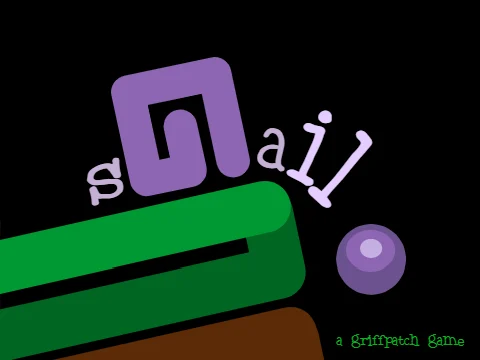
Snail Platformer is a compact single-player game by griffpatch, and it’s one of his most-remixed platformers. Versions up to v1.4 appear in many players’ favorites, and v1.3 remixes are common on user profiles.
- Type: Compact single-player platformer
- Controls: Keyboard movement and jump
- Difficulty: Easy-medium
- Rough length: Short
- Standout: It’s small enough to read through in the editor after you’ve played it, which makes it good study material for new builders.
- Who it suits: Beginners, and creators who want to see a clean griffpatch engine without a large game around it.
8. Cloud Platformer Multiplayer Fun by griffpatch: cloud multiplayer
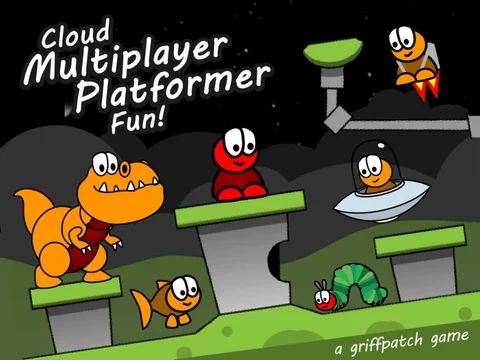
Cloud Platformer Multiplayer Fun uses Scratch’s cloud variables to put other Scratchers in your level in real time. Versions up to v1.42 appear in many users’ favorites, and it’s the most-shared pick for playing with friends.
- Type: Cloud multiplayer platformer
- Controls: Keyboard movement and jump
- Difficulty: Easy. The fun comes from the other players rather than the challenge.
- Rough length: Session-based
- Standout: Live multiplayer running on cloud data. Cloud variables can only store numbers, so griffpatch encodes each player’s position as numbers.
- Who it suits: Groups of friends who want to hang out and race.
There’s one important limit. Scratch only lets full “Scratcher” accounts use cloud data. If you aren’t signed in, or your account still has “New Scratcher” status, the multiplayer features may not work for you. That’s a Scratch rule, not a bug in the game.
9. Massive Multiplayer Platformer by griffpatch
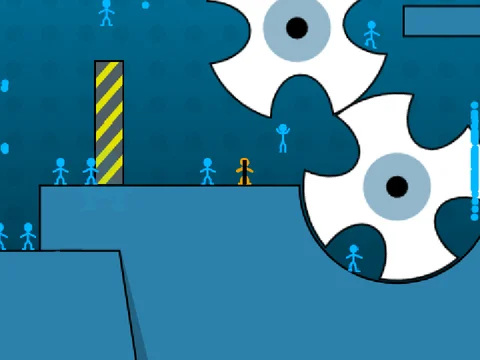
Massive Multiplayer Platformer is griffpatch’s other cloud platformer, designed for bigger and busier shared levels. His profile lists v1.3, and it’s also one of the projects he has favorited.
- Type: Cloud multiplayer platformer
- Controls: Keyboard movement and jump
- Difficulty: Easy
- Rough length: Session-based
- Standout: Many players sharing one space
- Who it suits: Players who enjoyed Cloud Platformer Multiplayer Fun and want a busier room.
The same cloud rules from Cloud Platformer Multiplayer Fun apply. If both cloud games seem empty, try a different time of day, because player numbers follow school hours in the US and Europe.
10. Paper Minecraft by griffpatch: sandbox with platforming
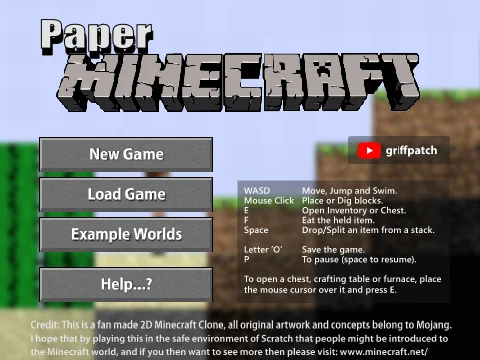
Paper Minecraft has the most views of any game on this list, at about 67 million (roam.gg, November 4, 2026). It’s included as a sandbox with platforming movement rather than a pure platformer. You run, jump, mine and build in a 2D take on Minecraft.
- Type: 2D sandbox with platformer movement
- Controls: Keyboard to move and jump, mouse to mine and place blocks
- Difficulty: Easy
- Rough length: Open-ended
- Standout: A full sandbox that works within Scratch’s limits
- Who it suits: Minecraft fans and younger players who want freedom more than a challenge
If you only want tight, level-based platforming, skip it. It’s on the list because many people searching for “good Scratch games” end up playing it anyway, and its jump and collision engine is as good as griffpatch’s dedicated platformers. For picks outside platforming, see our list of the best free Scratch games to play.
Community picks from curated studios
Two Scratch Studios rank alongside this guide for platformers: “Best of platformer games” and “Awesome Platformers!”. Curators add their projects by hand, so they’re a good next stop after the ten games above. Other community projects that often show up in players’ favorites include Will_Wam’s Super Mario Bros. Level Pack 2023 and epninja’s Extreme Ninja Parkour Master!, which griffpatch has loved himself.
Best Scratch platformers by type
Pick by mood: Scratchnapped to relax, Getting Over It for punishment, Appel for mastery, the cloud games for friends, and Geometry Dash 2.2 Platformer Mode for rhythm. This table matches each sub-genre to the best game for it:
| If you want… | Play | Why |
|---|---|---|
| Precision / speedrun | Appel | Tight movement, timed levels |
| Rage / physics | Getting Over It | Mouse-driven climbing, big falls |
| Scrolling adventure | Scratchnapped | Story, characters, gentle difficulty |
| Fast action | Epic Ninja | Movement built on momentum |
| Rhythm / Geometry Dash style | Geometry Dash 2.2 Platformer Mode, Geometry Dash by NormanTheGamer | Free movement in 2.2 style, or classic one-button timing |
| An original idea | Lightcube Platformer | The cube’s light is your only view of the cave |
| Play with friends | Cloud Platformer Multiplayer Fun | Live cloud multiplayer |
| Short and simple | Snail Platformer | Quick to finish and easy to study |
| Sandbox | Paper Minecraft | Movement plus building |
Best for beginners and younger players
Scratchnapped and Snail Platformer are the gentlest places to start. Paper Minecraft is the most forgiving because nothing in it is timed. Scratch is designed mainly for ages 8 to 16, and these three suit the younger end of that range: mistakes don’t cost much, and the goals are easy to understand.
Hardest platformers on Scratch
Getting Over It is the hardest game here, because one mistake can undo several minutes of progress. Appel’s late levels are next for precision. Geometry Dash-style games such as NormanTheGamer’s Geometry Dash are hard in a different way. Each level is short, but you’ll need many attempts to get the rhythm right.
Best to play with friends
Play Cloud Platformer Multiplayer Fun with small groups and Massive Multiplayer Platformer with big ones. You can also turn any single-player game into a group activity with a race: everyone plays Appel or one Geometry Dash level and posts their best time or attempt count. The Discord section below explains how to set this up.
Best Geometry Dash-style games
Play Geometry Dash 2.2 Platformer Mode by -GeometricalCoder- if you want the newer platformer mode. Play Geometry Dash by NormanTheGamer for the classic auto-runner. NormanTheGamer first made his version in December 2023, and it now has more than 2.6 million views. It has 4 levels, and you jump with the up arrow, space, W or a click. The one-input scheme means it also works well on a touchscreen.
What happened to griffpatch’s Geometry Dash?
griffpatch’s “Geometry Dash v1.5”, from April 2016, was once one of the most-viewed projects on Scratch. It no longer loads, because the project is gone. Only remixes and re-uploads of it remain. It still appears in some users’ favorites lists, but those entries no longer open.
That’s why it isn’t in the ranking. These are your best options:
- Play Geometry Dash 2.2 Platformer Mode by -GeometricalCoder- or Geometry Dash by NormanTheGamer. Both are live, popular Geometry Dash games on Scratch.
- Look on Scratch for griffpatch’s tutorial material. His tutorial projects and studios are separate from the deleted game, and building the engine yourself is the most dependable way to have a Geometry Dash on Scratch.
- Be wary of re-uploads that claim to be “the original griffpatch Geometry Dash”. Re-uploading someone else’s project without credit breaks Scratch’s remix rules, and these copies are often old or broken.
If you’re coming from the commercial game, the official Geometry Dash on mobile and Steam has the full level set.
Play Scratch platformers smoother: TurboWarp, 60 FPS and interpolation
TurboWarp is a free, open-source Scratch mod that compiles a project’s blocks to JavaScript, so the same projects run faster. It can also go beyond Scratch’s fixed 30 FPS, either with a framerate you set or with interpolation. The Flathub listing for TurboWarp Desktop highlights optional interpolation, 60 FPS, high-quality pen and infinite clones. MIT and the Scratch Foundation don’t make it, but it loads projects straight from Scratch, so you’re playing the creator’s own shared version.
Quick steps: open a Scratch platformer in TurboWarp
- Open the project on scratch.mit.edu and copy the number at the end of the address.
- Go to turbowarp.org/ followed by that number.
- Add ?interpolate to the end of the address for smoother motion that doesn’t change the game’s speed.
- Only use ?fps=60 if the game supports it (see below).
- Click the full-screen button, then the green flag.
| Feature | Scratch (vanilla) | TurboWarp |
|---|---|---|
| Framerate | Fixed 30 FPS | Any framerate you choose, or 60 FPS |
| Smooth motion with 30 FPS logic | No | Interpolation option |
| Script speed | Interpreted | Compiled to JavaScript, usually much faster |
| Clone limit | 300 | Optional infinite clones |
| Pen quality | Standard | Optional high-quality pen |
| Cloud variables | Yes, for Scratchers | Connects to cloud data on many projects |
| Comments, loves, favorites | Yes | No, use Scratch for those |
| Offline play | Scratch app for your own projects | TurboWarp Desktop and Packager |
Two practical points. First, loves and comments only count on scratch.mit.edu, so go back to the project page afterward if you want to support the creator. Second, TurboWarp’s speed comes from its compiler. A project that lags on vanilla Scratch in your browser often runs smoothly in TurboWarp, even on a weak laptop.
Analyst note
Try ?interpolate before ?fps=60. Interpolation keeps the game logic at its intended 30 ticks per second and only smooths the picture, so jump heights and timing stay the way the creator tuned them.
When 60 FPS breaks a game
Most Scratch platformers move the player by a fixed amount every frame. The Invent with Scratch build, for example, adds a gravity of -2 to the y velocity each frame and walks at 6 pixels per frame. Run that engine at 60 FPS and everything happens twice as often each second. You walk twice as fast and fall twice as fast, and a 45-second timer that counts frames finishes at a different real-world speed.
That’s why some players say a game feels “floaty” or “too fast” in TurboWarp. Use this rule of thumb:
- Physics tied to frames (most classic engines): use interpolation and keep FPS at 30.
- Games built for 60 FPS: the project notes usually say so. Use ?fps=60.
- Rhythm games: be careful. Changing the FPS can push jumps out of time with the music.
If you make games and wonder whether to package yours at 60 FPS, the answer is clear. Only do it if you built and tested the physics at 60, either with values tuned for 60 or with movement scaled by elapsed time. Otherwise, package at 30 with interpolation turned on.
Playing offline with TurboWarp Desktop
TurboWarp Desktop runs projects outside the browser. The TurboWarp Packager turns a project file into a standalone HTML file or app, and many creators use it to share smooth builds of their own games. Only package projects you made or have permission to redistribute. Downloading someone else’s game and publishing it as your own breaks Scratch’s community norms, even though the license allows remixing with credit. If you’re interested in downloadable games more generally, our guide to the best freeware games worth downloading covers them.
How to find good platformers yourself
Search Scratch for “platformer” and sort the results. Then judge each project yourself by its loves-to-views ratio, its “Remixed from” credit and the creator’s other projects. Scratch’s Explore page and search let you sort by Trending, Popular or Recent, and the Games category narrows the results further.
- Search “platformer” and sort by Popular for proven hits, or by Trending to see what’s rising this week.
- Compare loves to views. Old hits keep gaining views from curious clicks, but a love is a deliberate choice. A newer game with a high loves-to-views ratio often beats an old game with a big view count.
- Read the studios. Curated Scratch Studios, including the two that rank for this topic, work as shortlists picked by people. A studio’s activity tab shows when its curators last added a project.
- Follow creators’ favorites. griffpatch’s favorites page lists projects he rates, as do the profiles of other well-known platformer creators.
- Check itch.io. It has a “made with Scratch” platformer category with hundreds of free games, many of them packaged with TurboWarp.
Analyst note
Before you commit to a “new” platformer, check for a “Remixed from” credit under the title. Many are reskins of a griffpatch engine with no new mechanic, so going straight to the original saves you time.
Red flags in a platformer project
Players in the community often complain that “so many platformers are just generic with nothing original, which ones actually have unique mechanics?” Generic projects are easy to spot:
- The title includes “engine”, “template” or “v1 remix”, but the instructions don’t describe a new mechanic.
- The levels use default tile art from a popular tutorial.
- Comments are turned off and there’s no credit to the original creator.
- The project page asks you to “please love and favorite” before explaining how to play.
Games with real ideas usually describe their mechanic in the first line of the instructions. Examples include gravity flips, grappling, time rewind, rhythm, cloud play and the light radius in Lightcube Platformer.
Make your own Scratch platformer
Start with a Scratch 3 starter project, then follow griffpatch’s Make a Classic Platformer or Code a Platformer series. Only move to Tile Scrolling Platformer once your fixed-screen collision works properly. Scrolling collision is where most beginner projects break, so learning in this order saves you a rewrite.
| Tutorial | Author | Scratch version | Length | What you end up with |
|---|---|---|---|---|
| Scratch Programming Playground, platformer chapter (book3 edition) | Al Sweigart (Invent with Scratch, No Starch Press) | Scratch 3 | One chapter | A single-screen platformer with gravity, jumping and a timer |
| Chapter 9, “Making an Advanced Platformer” (first edition) | Al Sweigart | Scratch 2 (.sb2 files) | One chapter | The same game with old block names. Use book3 instead |
| Make a Classic Platformer | griffpatch | Scratch 3 | 16+ parts | A complete classic platformer engine |
| Code a Platformer | griffpatch (projects on GriffpatchTutorCodes) | Scratch 3 | 10+ episodes | A tidy modern engine you can extend |
| Tile Scrolling Platformer | griffpatch (projects on GriffpatchTutorCodes) | Scratch 3 | 8-9+ episodes | A tile-based scrolling level engine |
The first edition of Invent with Scratch is still a top search result for platformer tutorials. It was written for Scratch 2, though. It uses.sb2 skeleton files and old block names such as “More Blocks” and the orange “Data” category. Use the Scratch 3 edition on the same site instead. Its game has the cat collecting apples and avoiding crabs against a 45-second timer.
Core engine concepts in 5 minutes
Nearly every good Scratch platformer, Appel included, is built on five ideas:
- Velocity variables. Store an x velocity and a y velocity, and change the player’s position by those values each frame instead of moving a fixed amount.
- Gravity. Subtract a small amount from y velocity every frame (-2 in the Invent with Scratch build). A jump simply sets y velocity to a positive number.
- Collision with “Run without screen refresh”. Create a custom block and tick “Run without screen refresh” as you make it. Inside it, move the player out of the ground 1 pixel at a time until it stops touching. The block finishes within one frame, so the player never visibly sinks.
- Hitboxes. Use a plain rectangle costume for collision, then switch to the animated costume for display. Animation frames change shape, so colliding with them makes the player snag and jitter.
- Cameras. For scrolling games, store the player’s world position separately from their screen position, and draw the level offset by the camera’s x and y.
Did you know?
Invent with Scratch’s platformer chapter explains the classic trick for clean landings: a custom block set to “Run without screen refresh”. It pushes the sprite out of the ground within one frame, so the player never sees it sink.
Which griffpatch series to follow, in order
- Make a Classic Platformer if you’re completely new. It builds every system from the ground up and explains why each one is needed.
- Code a Platformer if you already understand variables and custom blocks and want a cleaner, more modern structure. The episode projects on the GriffpatchTutorCodes profile let you compare your code with his at each step.
- Tile Scrolling Platformer once your single-screen game has no collision bugs. Tile engines change how levels are stored and drawn, so any collision bugs you bring with you will multiply. Geometry Dash 2.2 Platformer Mode shows what a finished game built on these tutorials can look like.
Build along in the editor while you watch the videos instead of just remixing the finished episode project. The goal is to understand why your character stops sinking into the floor.
Templates and engines worth remixing
Scratch is built for remixing, and the episode projects on GriffpatchTutorCodes are honest starting points because they’re clearly labelled as tutorials. Good habits:
- Keep the “Remixed from” credit and name the engine in your Notes and Credits.
- Add at least one mechanic of your own before sharing, such as a wall jump, a double jump or a gravity switch.
- Change the art and the level layout. Players notice a reskin with default tiles straight away.
Fixing the 3 most common bugs
These are the problems people ask about most on the Scratch forums, along with the standard fixes.
| Problem (as players phrase it) | Cause | Fix |
|---|---|---|
| “Why does my player sink into the ground when it falls fast?” | At high falling speed, the sprite moves several pixels into the floor in a single frame | Cap the maximum fall speed, and push the player out 1 pixel at a time inside a “Run without screen refresh” block |
| “My sprite gets stuck in the wall and I don’t know how to push it back out” | X and Y movement are checked together, so the game can’t tell a wall from a floor | Move on X, check, and undo X if touching. Then move on Y, check, and undo Y if touching. Always handle the two axes separately |
| “Wall collision glitches when the scrolling camera moves” / “mine is laggy and broken” | Collision is checked after the level moves but before the player’s position updates | Do all collision in world coordinates first, then update the camera, then draw. Never move the level partway through a collision check |
How do I add wall jumping to my platformer? Once your X collision step stops the player against a wall, record which side the wall is on. If the player is in the air, touching a wall and presses jump, set y velocity to your jump value and set x velocity to push away from the wall. Ignore horizontal input for a few frames afterwards with a short timer. Otherwise the player can climb straight back up the same wall.
Running Scratch platformer events in your Discord
Scratch platformers work well for Discord events because they’re free, they run in a browser and times are easy to compare. These formats work well, and these rules keep them fair.
Event formats
- Weekly speedrun race. Choose one Appel level or one level of a Geometry Dash-style game. Players post a screen recording of their best time or lowest attempt count by Sunday.
- Rage marathon. A Getting Over It height challenge: whoever climbs highest in 30 minutes wins.
- Level-share challenge. Builders remix a tutorial engine, add one new mechanic and post the project link. Members vote with reactions.
- Remix jam. A 48-hour build around a theme such as “one button” or “gravity”, judged on originality rather than views.
- Cloud meetup. Everyone joins Cloud Platformer Multiplayer Fun at the same time for a casual session.
Fair-play rules for TurboWarp vs. vanilla
State up front which runtime counts. The simplest rule: times only count on vanilla Scratch, or on TurboWarp at default settings with no turbo mode and no FPS change. A game built for 30 FPS really does run faster at 60 FPS, so those times aren’t valid. Require full-screen recordings and ban mods, autoclickers and edited project files. Remixed copies of the game don’t count.
Channel setup
A simple layout works well. Use #scratch-events for announcements and #level-share for project links. Set up #speedrun-submissions with Slow Mode on and only the Attach Files and Embed Links permissions enabled. Give event staff the Manage Messages permission so they can remove off-topic posts. A leaderboard or reminder bot saves manual work, and our guide to the best Discord bots for gaming servers covers the options. If you’d rather join a server than build one, see our list of the best Discord servers for gamers.
Stay safe
Discord requires users to be at least 13, and many Scratch players are younger, so check your server’s age rules. Never ask anyone for their Scratch password, and delete “free Nitro” or “free Scratch membership” links as soon as you see them.
FAQ
What is the best platformer on Scratch?
Appel by griffpatch is the best all-round platformer on Scratch. It has tight controls, clean collision, timed levels and about 15.6 million views as of November 4, 2026 (roam.gg). For something harder, play Getting Over It. For rhythm, play Geometry Dash 2.2 Platformer Mode by -GeometricalCoder-.
What is the most popular Scratch game of all time?
griffpatch’s Paper Minecraft leads roam.gg’s November 4, 2026 list of games that are still live, with about 67 million views. His “Geometry Dash v1.5” was once one of the most-viewed projects on Scratch, but it no longer loads.
Who made Appel on Scratch?
Appel was made by griffpatch, the Scratch username of English programmer and YouTuber Andrew Oliver Griffin, who is the most-followed user on Scratch. Fan sites report that the game has more than 25,000 remixes.
Is griffpatch’s Geometry Dash still on Scratch?
No. “Geometry Dash v1.5” from April 2016 no longer loads on Scratch, and only remixes and re-uploads of it remain. Avoid re-uploads that claim to be the original. To play Geometry Dash on Scratch today, open Geometry Dash 2.2 Platformer Mode by -GeometricalCoder- or Geometry Dash by NormanTheGamer. To build your own, follow griffpatch’s tutorials.
How do you make a platformer game in Scratch 3?
Create x and y velocity variables and subtract gravity from y velocity every frame. Handle collision in a custom block with “Run without screen refresh” turned on, and check X and Y movement separately. griffpatch’s Make a Classic Platformer series covers every step, and the Scratch 3 edition of Invent with Scratch has a shorter one-chapter version.
What is TurboWarp and is it safe?
TurboWarp is a free, open-source Scratch mod that compiles projects to JavaScript so they run faster and more smoothly. It loads projects directly from Scratch and is widely used in the Scratch community. It isn’t official, though, so loves, comments and your account activity stay on scratch.mit.edu.
How do I play Scratch games at 60 FPS?
In the project’s address, replace scratch.mit.edu/projects/ with turbowarp.org/ and add ?fps=60. If jumps then feel too fast or floaty, remove it and use ?interpolate instead, because many engines tie their physics to the frame rate.
Can you download Scratch platformers to play offline?
Yes, in two ways. TurboWarp Desktop runs project files offline, and the TurboWarp Packager turns a project into a standalone HTML file or app. Only redistribute games you made or have permission to share.
Where is a good Scratch platformer template?
The most widely used starting points are the episode projects from Code a Platformer and Tile Scrolling Platformer on the GriffpatchTutorCodes Scratch profile. Keep the remix credit and add at least one mechanic of your own before you share.
Which griffpatch platformer tutorial should I follow?
Beginners should start with Make a Classic Platformer. If you already know variables and custom blocks, Code a Platformer is the cleaner route. Only move to Tile Scrolling Platformer once your fixed-screen collision has no bugs.
Where to go from here
If you only play one game from this list, make it Appel. Clear its levels once, then try to beat your own times, because that’s where its movement engine really stands out. After that, open Code a Platformer in a second tab and try to rebuild Appel’s jump yourself. Once you understand why a sprite lands cleanly instead of sinking, you’ll notice the difference between a generic Scratch platformer and a great one in every game you play.
About this article

Written by Joseph Smith
Joseph Smith is a digital nomad born in the 90s who grew up on PlayStation platformers and Halo 2 multiplayer. He plays Counter-Strike and Dota 2 competitively and started Toopics to bring gamers closer together, especially through Discord. More about Joseph
- Published
Sources (8)
- Best Scratch games (roam.gg) (roam.gg)
- Appel fan site (appel.lol)
- About Appel (fan site) (appel.lol)
- 25 Best Scratch Games - CodeWizardsHQ (codewizardshq.com)
- griffpatch - YouTube Wiki (youtube.fandom.com)
- griffpatch stats - scratchviews.com (scratchviews.com)
- Geometry Dash Scratch - Pocket Tactics (pockettactics.com)
- Scratch statistics - JetLearn (jetlearn.com)