
Pick a gaming PC by starting with the games you play and the monitor you own, then spend most of the budget on the graphics card. Esports titles like Valorant and Counter-Strike 2 want a fast CPU and a high-refresh display, while story-driven games like Cyberpunk 2077 want GPU power and 16GB of VRAM. We walk through each decision below with real part names, dated prices and the spec sheet traps to avoid.
Start with your games, not a parts list
Most buying mistakes come from shopping backwards. People fall in love with a case or a CPU, then discover the games they play never needed it.
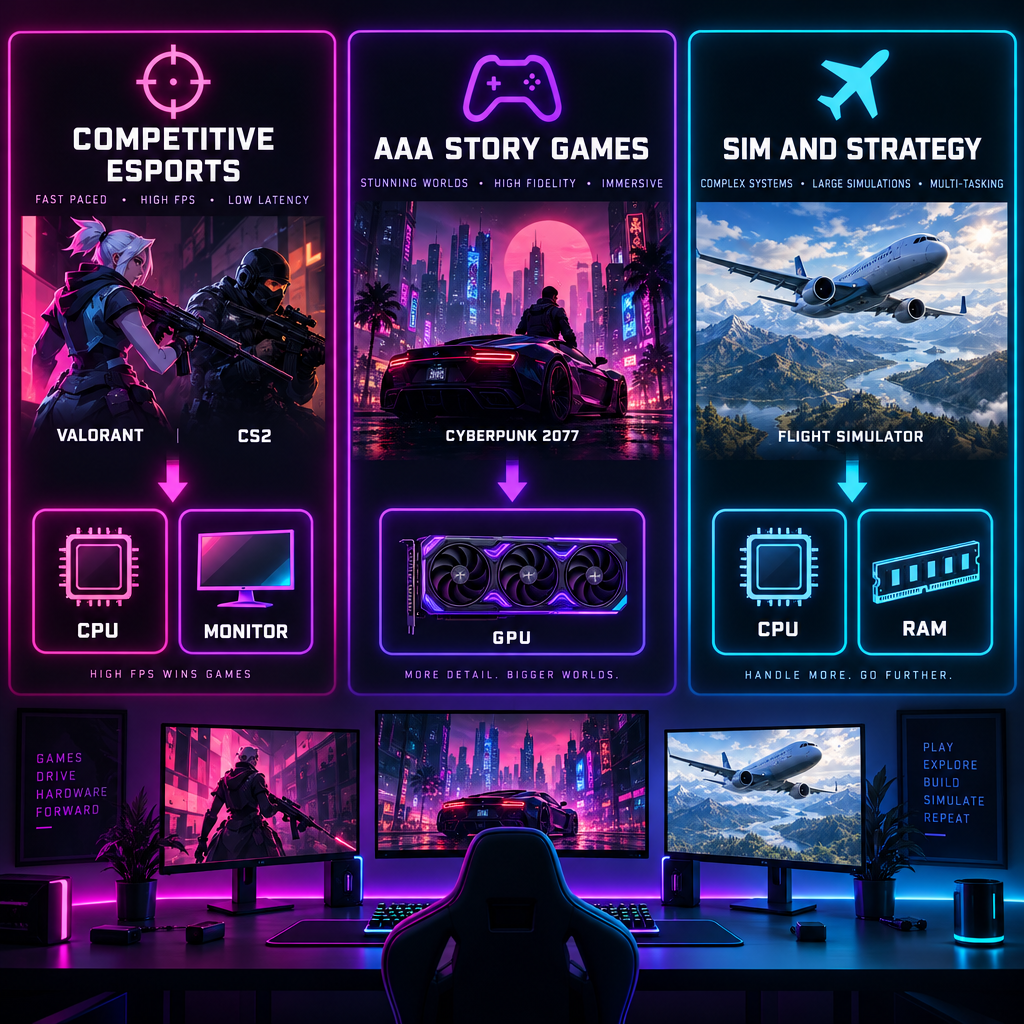
So we sort games into three buckets. Each one pulls the budget in a different direction.
| Game type | Examples | What limits frame rate | Where the money goes |
|---|---|---|---|
| Competitive shooters | Valorant, CS2, Fortnite on Performance mode | CPU and memory speed | CPU, 240Hz+ monitor |
| Modern AAA | Cyberpunk 2077, Monster Hunter Wilds, Black Myth: Wukong | GPU and VRAM | Graphics card |
| Sim and strategy | Microsoft Flight Simulator 2024, Cities: Skylines II | CPU cores and RAM | CPU, 32GB+ memory |
The published requirements show how far apart these buckets sit. Riot lists an Intel Core i5-9400F and a GeForce GTX 1050 Ti as the spec for 144+ fps in Valorant. Both parts are over six years old. Valve’s Counter-Strike 2 minimum asks for four CPU cores, 8GB of RAM and a DirectX 11 card with 1GB of VRAM.
Then look at the other end. CD Projekt Red’s recommended spec for Cyberpunk 2077 at 1080p high, updated with the 2.0 patch in September 2023, is a Core i7-12700 or Ryzen 7 7800X3D with an RTX 2060 Super or RX 5700 XT and 16GB of RAM. Capcom’s recommended spec for Monster Hunter Wilds lists an RTX 2070 Super for 1080p 60fps, and that figure assumes frame generation is switched on.
If your library is mostly Riot and Valve titles, a mid-range gaming PC is already overkill on the GPU side. If you want the newest AAA releases at high settings, the GPU becomes the whole conversation.
One more honest note. Browser titles and small indie projects, including scratch games, run on any integrated graphics made in the last five years. Nobody needs a dedicated gaming desktop for those.
Set the budget by resolution and refresh rate
The monitor decides how much GPU you need. Buying a PC without knowing the display is guessing.
| Target | Typical use | Realistic GPU class | Rough desktop budget (late 2025) |
|---|---|---|---|
| 1080p, 144Hz+ | Esports | RTX 5060 / RX 9060 XT 16GB | $800 to $1,100 |
| 1440p, 144Hz | Mixed esports and AAA | RTX 5070 / RX 9070 | $1,200 to $1,600 |
| 1440p, 240Hz or 4K 60 | AAA at high settings | RTX 5070 Ti / RX 9070 XT | $1,700 to $2,300 |
| 4K, 120Hz+ with ray tracing | No compromises | RTX 5080 / RTX 5090 | $2,800 and up |
Treat those budget columns as ranges, not quotes. Street prices on graphics cards and especially DDR5 memory moved a lot through 2025, and the same prebuilt can swing by a few hundred dollars between sales events.
The rule we apply: the GPU should take 35 to 45 percent of a desktop budget. If a prebuilt listing has a flashy CPU and a cheap card, the money went to the wrong place.
The graphics card decides most of it
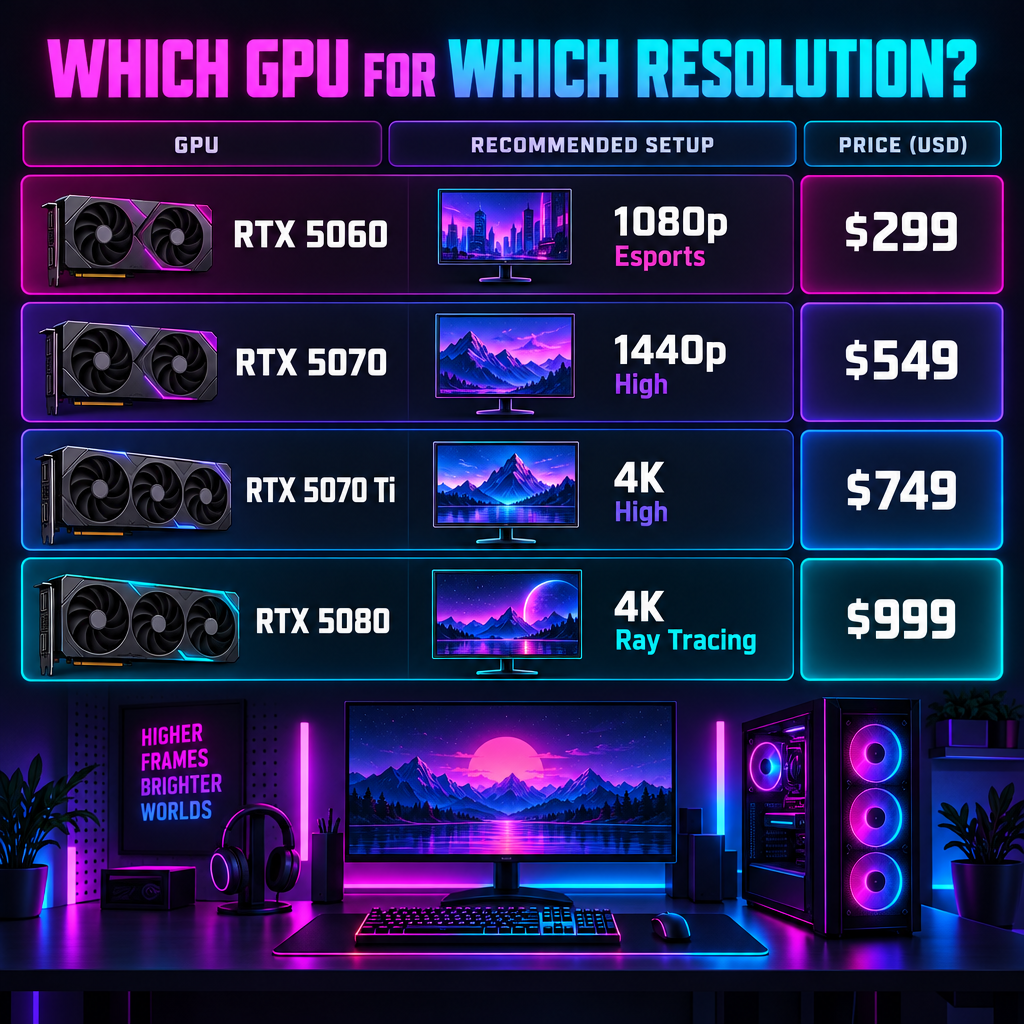
Every other part supports the GPU. So we pick it first and build around it.
Here are the current cards we would consider, with launch MSRPs. Retail prices drift above these during shortages, so compare before buying.
| Card | VRAM | Launch MSRP | Launched | Sweet spot |
|---|---|---|---|---|
| GeForce RTX 5060 | 8GB | $299 | May 2025 | 1080p esports |
| Radeon RX 9060 XT 16GB | 16GB | $349 | June 2025 | 1080p and light 1440p |
| GeForce RTX 5060 Ti 16GB | 16GB | $429 | April 2025 | 1440p medium to high |
| GeForce RTX 5070 | 12GB | $549 | March 2025 | 1440p high |
| Radeon RX 9070 XT | 16GB | $599 | March 2025 | 1440p ultra, 4K medium |
| GeForce RTX 5070 Ti | 16GB | $749 | February 2025 | 1440p ultra, 4K high |
| GeForce RTX 5080 | 16GB | $999 | January 2025 | 4K high with ray tracing |
| GeForce RTX 5090 | 32GB | $1,999 | January 2025 | 4K everything |
Why VRAM matters more than it used to
Texture packs in 2024 and 2025 releases routinely push past 8GB at 1440p ultra. When a card runs out of VRAM, you get stutter rather than a lower average, and no settings tweak fully fixes it.
Our position: 8GB is fine for esports at 1080p and nothing else. For a gaming PC you plan to keep three years, 12GB is the floor and 16GB is the comfortable choice. That is why the 16GB RX 9060 XT and 16GB RTX 5060 Ti beat their 8GB siblings even at a higher price.
Nvidia or Radeon
Nvidia wins on ray tracing performance, DLSS 4 upscaling quality and the NVENC encoder for streaming. Radeon wins on VRAM per dollar and raster performance at the same price. FSR 4 closed much of the upscaling gap on RX 9000 cards.
For a pure esports gaming PC, buy whichever is cheaper. For AAA ray tracing or streaming to Twitch, Nvidia still has the edge.
Analyst note
Riot’s own 144+ fps spec for Valorant is a GTX 1050 Ti, a card from 2016. Put the savings into a 240Hz or 360Hz monitor and a Ryzen 7 7800X3D instead of a bigger GPU, because the CPU is what holds the 1% lows up in competitive titles.
The CPU: where X3D earns its price
For AAA games at 1440p and above, the GPU is the bottleneck and a six-core CPU is enough. For competitive shooters at 240Hz or higher, the CPU sets the ceiling.
AMD’s X3D chips with stacked L3 cache are the clear pick for high-refresh gaming. The Ryzen 7 7800X3D, launched April 2023 at $449, is still the best value in that class. The Ryzen 7 9800X3D, launched November 2024 at $479, is faster and the current gaming leader.
On the Intel side, the Core Ultra 7 265K launched in October 2024 on the new LGA1851 socket. It is a strong productivity chip and a middling gaming chip compared with X3D parts at the same price.
| Tier | AMD pick | Intel pick | Fits |
|---|---|---|---|
| Budget | Ryzen 5 7600 | Core i5-14400F | 1080p to 1440p, GPU-limited games |
| Mid | Ryzen 5 9600X | Core i5-14600K | Balanced AAA and esports |
| High-refresh esports | Ryzen 7 7800X3D | Core i7-14700K | 240Hz+ competitive |
| Top | Ryzen 7 9800X3D | Core Ultra 9 285K | Everything, plus streaming |
One socket note. AMD’s AM5 platform has a confirmed upgrade path through 2027, so a Ryzen 5 today can become a 9800X3D later on the same motherboard. Intel’s LGA1700 boards, used by 12th through 14th Gen, are at the end of the line.
Memory and storage: the parts prebuilts cut
RAM
16GB works for esports titles today. It does not work for Star Wars Outlaws, Hogwarts Legacy at high texture settings, or anything running alongside Discord, Chrome and a streaming app.
Buy 32GB of DDR5 in two sticks. The two-stick part matters. A single 16GB stick runs in single-channel mode and costs real frames in CPU-bound games.
Speed targets: DDR5-6000 CL30 for AM5, where the memory controller runs best. Faster kits above that show small gains and cost more than they return.
Storage
A 1TB NVMe SSD is the minimum we accept in 2025. Call of Duty: Black Ops 6 with Warzone can pass 200GB installed. Cyberpunk 2077 lists 70GB. Four or five modern titles fill a 1TB drive.
PCIe 4.0 NVMe drives read at around 7,000MB/s against roughly 550MB/s for an old SATA SSD. The in-game difference is modest, but Windows, shader compilation and DirectStorage titles like Forspoken all benefit. Skip PCIe 5.0 drives for gaming. They run hot and the games cannot use the extra bandwidth yet.
Prebuilt, custom build or gaming laptop
| Option | Best for | Trade-off |
|---|---|---|
| Prebuilt desktop | First PC, warranty, no tool time | Mystery parts, markup on mid-range |
| Custom build | Best value per dollar, upgrades | Your own troubleshooting |
| Boutique build-to-order | Picked parts, single warranty | Premium of 10 to 25 percent |
| Gaming laptop | Dorm, travel, shared space | Lower performance per dollar, fixed GPU |
Prebuilt desktops
Brands like ASUS ROG, Alienware, HP Omen, Lenovo Legion, CLX, Corsair and NZXT sell complete gaming desktops with a full warranty. Big retailers push these hard with seasonal discounts, and a good sale can bring a prebuilt under the cost of the parts alone.
The catch is the spec sheet. Prebuilt pages lead with the CPU and GPU, then hide the memory configuration, PSU brand and motherboard model. We cover the traps in the next section.
Building it yourself
A custom build still returns the most performance for the money and lets you choose every part. It also means you handle any dead-on-arrival part or boot failure. If you have an hour of patience and a YouTube tutorial, it is worth it. If a BIOS screen makes you nervous, buy prebuilt.
Gaming laptops
A laptop with an RTX 5070 does not match a desktop RTX 5070. Mobile GPUs run at lower power limits, often 100W to 140W, and laptop chips are rated separately for a reason. Buy a gaming laptop because you need portability, and expect to pay more for less.
Spec sheet traps in prebuilt gaming PCs
These are the lines to read twice before you check out.
- Single-channel memory. “16GB DDR5” with one stick. Ask for 2x8GB or 2x16GB.
- 8GB cards above $800. An RTX 5060 in a $1,100 desktop is a bad match. Look for 12GB or 16GB at that price.
- Unnamed power supply. “650W PSU” with no brand or 80 Plus rating. Nvidia’s own recommendation for an RTX 5070 is a 650W supply, and for a 5080 it is 850W. A no-name 650W unit at full load is a gamble.
- Proprietary parts. Some big-box desktops use custom motherboards and PSU connectors that block future upgrades. Search the model number plus “proprietary” before buying.
- DDR4 in a 2025 system. It signals an older platform, often a last-gen Intel board with no upgrade path.
- 512GB SSD. You will be uninstalling games in a month.
- Airflow-free cases. A solid glass front panel with no mesh means higher temperatures and louder fans.
- “Up to” specs on laptops. The listing shows the top configuration, the price shows the base one. Match them.
Quick steps: pick a gaming PC
- List the five games you play most and note their recommended specs.
- Confirm your monitor resolution and refresh rate, or pick the monitor first.
- Choose a GPU tier from the resolution table with 12GB VRAM or more.
- Pair it with a six-core CPU for AAA or an X3D chip for 240Hz esports.
- Require 32GB DDR5 in two sticks and a 1TB NVMe drive.
- Check the PSU brand, wattage and 80 Plus rating on the listing.
- Compare the prebuilt price against the same parts at retail before paying.
Windows, anti-cheat and what must be switched on
Every gaming PC sold today ships with Windows 11, and that is the correct choice. Microsoft ended free support for Windows 10 on October 14, 2025. Running an unsupported OS on a machine that logs into Steam, Riot and Battle.net is a security problem.
Anti-cheat adds its own requirements. Riot Vanguard requires TPM 2.0 and Secure Boot enabled on Windows 11 to launch Valorant. Call of Duty and Battlefield 6 added similar checks in 2025. Any new desktop meets these, but a used PC built before 2018 might not, and some prebuilts ship with Secure Boot off in the BIOS.
Check it in Windows: press Win + R, type msinfo32 and look at the Secure Boot State line. Press Win + R, type tpm.msc, and confirm the specification version reads 2.0.
Streaming and Discord from the same PC
Many of us play with a Discord call open and a Go Live stream running for friends. That workload changes two decisions.
First, the encoder. Nvidia’s NVENC on RTX 40 and 50 series cards and AMD’s encoder on RX 7000 and 9000 both support AV1, which looks better than H.264 at the same bitrate. For Twitch, OBS with NVENC costs almost no frame rate on a modern Nvidia card. CPU encoding at x264 medium costs a lot and needs eight cores or more.
Second, Discord’s own limits. A free account streams Go Live at up to 720p and 30fps. Nitro raises that to 1080p 60fps with higher source resolutions. No hardware fixes the free-tier cap.
Discord also uses the GPU for its interface. If the app stutters during games, the toggle is at User Settings > Advanced > Hardware Acceleration. Turning it off moves the work to the CPU, which helps on an older GPU and hurts on an older CPU. Test both.
If you run a community server, the same machine can host automation. Most people pick a hosted option from the usual discord bots for gaming rather than running one locally, so the PC spec does not matter there.
Buying used and avoiding scams
The used market is where the best value lives and where most buyers lose money.
A used RTX 4070 Super, which launched at $599 in January 2024, usually sells well below a new RTX 5070 and performs close to it. A used Ryzen 7 7800X3D holds value for the same reason. Whole secondhand desktops from the 2022 to 2023 era are often the best buy for a 1440p gaming PC under $900.
The rules we follow:
- Meet in person for a full system, boot it, and run a stress test on the spot. FurMark for the GPU and Cinebench for the CPU, five minutes each, with temperatures visible.
- For a GPU alone, ask for a screenshot of GPU-Z showing the model, VRAM and BIOS, plus a short clip of a game running with an fps counter.
- Pay through a platform with buyer protection. Never pay “friends and family” or with gift cards.
- Check the serial number against the manufacturer’s warranty lookup. Many Nvidia partner cards carry three years from the original purchase.
Stay safe
Discord DMs offering “cheap gaming PCs” or GPUs from a “friend who works at a warehouse” are scams, and so are giveaway bots asking you to log in on a lookalike site. Buy only through platforms with buyer protection and never share a login or a QR code to claim a prize.
Three example builds by budget
These are the configurations we would actually buy in late 2025. Swap the GPU for the Radeon or Nvidia equivalent in the table above if the price favours it that week.
Esports gaming PC, around $1,000
Ryzen 5 7600, RX 9060 XT 16GB or RTX 5060 Ti 16GB, 32GB DDR5-6000, 1TB PCIe 4.0 NVMe, 650W 80 Plus Gold PSU, B650 motherboard. This runs Valorant, CS2 and Fortnite Performance mode far past 240fps at 1080p and handles 1440p AAA at medium to high.
Balanced 1440p PC, around $1,500
Ryzen 7 7800X3D, RTX 5070 or RX 9070 XT, 32GB DDR5-6000, 2TB NVMe, 750W Gold PSU. The X3D chip keeps 1% lows high in shooters while the GPU handles ultra settings in most 2025 releases at 1440p.
4K PC, around $2,500
Ryzen 7 9800X3D, RTX 5070 Ti or RTX 5080, 32GB DDR5-6000, 2TB NVMe, 850W Gold PSU, a mesh-front case with three intake fans. This is the point where ray tracing at 4K becomes playable with DLSS 4 and frame generation on.
Upgrade order when the budget runs out
If a prebuilt comes close but misses in one spot, these upgrades return the most per dollar in order:
- Second stick of RAM to reach dual-channel 32GB.
- Graphics card, since it is the cheapest part to swap and the biggest gain.
- 2TB NVMe drive once the first fills up.
- CPU, but only on AM5, where the socket has a future.
- Power supply, which should happen before any GPU upgrade past the original wattage.
FAQ
How much should a gaming PC cost?
A capable 1080p esports desktop lands around $800 to $1,100 as of late 2025. A 1440p machine for new AAA titles at high settings runs $1,200 to $1,600. Above $2,500 you are paying for 4K and ray tracing. Prices on GPUs and DDR5 memory move month to month, so compare the parts list against retail before paying for a prebuilt.
Is a prebuilt gaming PC worth it?
Yes, when it is on sale and the spec sheet checks out. A warranty covering the whole system has real value for a first PC. It stops being worth it when the listing hides a single memory stick, an unnamed power supply or an 8GB graphics card in a $1,000-plus system.
Do I need an Intel or AMD CPU for gaming?
For gaming alone, AMD’s Ryzen 7 7800X3D and 9800X3D lead every current Intel chip, and AM5 has a longer upgrade path. Intel’s Core Ultra 200 series is competitive for productivity and video work. If the PC is for games first, pick AMD.
Is 16GB of RAM enough for a gaming PC?
For Valorant, CS2 and Fortnite, yes. For 2024 and 2025 AAA releases with Discord and a browser open, no. Buy 32GB in two sticks, because a single stick halves memory bandwidth and costs frames in CPU-limited games.
Can a gaming laptop replace a desktop?
Only if you need the portability. A laptop RTX 5070 runs at a lower power limit than the desktop card and performs well below it. You also cannot upgrade the GPU later. For a fixed desk setup, a desktop returns far more performance per dollar.
Will my gaming PC run Valorant on Windows 11?
Riot Vanguard requires TPM 2.0 and Secure Boot enabled. Any new desktop supports both, but check the BIOS on prebuilts and used systems. Run tpm.msc and msinfo32 in Windows to confirm before launch day.