
Scratch games are projects built with MIT’s block-based coding language, and every one of them plays free in a browser tab with no download and no account. The best ones, like griffpatch’s Paper Minecraft and Appel, hold up against commercial indie games. This list covers the ten worth your time, how to load them without lag, and how to find the next hundred yourself.
What counts as a Scratch game
Scratch is a free coding platform from the Lifelong Kindergarten group at the MIT Media Lab, now run by the non-profit Scratch Foundation. It launched in 2007, and the current version, Scratch 3.0, went live on January 2, 2019. That release matters for players because it replaced Flash with JavaScript, so projects run natively in Chrome, Firefox, Edge and Safari with nothing to install.
Every project on the site is user-made and shared under a Creative Commons license. The community has shared well over 100 million projects, and the Games category is the busiest corner of it. Quality ranges from a seven-year-old’s first maze to full engines with physics, cloud multiplayer and save codes.
A quick note on search terms. If you typed “scratchy game” or “scratch gaming”, you almost certainly meant this platform, not scratch cards or DJ scratching. The site itself, the Scratch Wiki and the forums all just say “Scratch projects”.
Scratch gaming has a distinct feel. The stage is a fixed 480 by 360 pixels, the engine runs at a locked 30 frames per second, and projects are capped at 300 clones at once. Good creators design around those walls, and the best games on this list turn them into a style.
How to play any Scratch game in 30 seconds
You do not need to sign up. Open a project page and the game sits in a player window at the top.
Quick steps: play a Scratch game
- Open scratch.mit.edu and click Explore in the top bar.
- Click the Games tab, then pick Trending, Popular or Recent.
- Click a project thumbnail to open its page.
- Click the green flag above the stage to start. Click the red stop sign to end.
- Click the fullscreen icon (top right of the stage) for a bigger view.
Two more controls are worth knowing. Shift-click the green flag to toggle Turbo Mode, which lets scripts run without waiting for screen redraws. It speeds up some older games and breaks others, so test it per project. The “See inside” button opens the full editor so you can read the code, which is the whole point of Scratch.
Scratch 3.0’s official browser support list is Chrome 63+, Firefox 57+, Edge 15+ and Safari 11+ on desktop, plus Chrome 63+ and Safari 11+ on tablets. Internet Explorer is not supported at all. Phones can open project pages but the editor is desktop and tablet only, and keyboard-controlled games are unplayable on a touchscreen unless the creator added on-screen buttons.
The 10 best free Scratch games
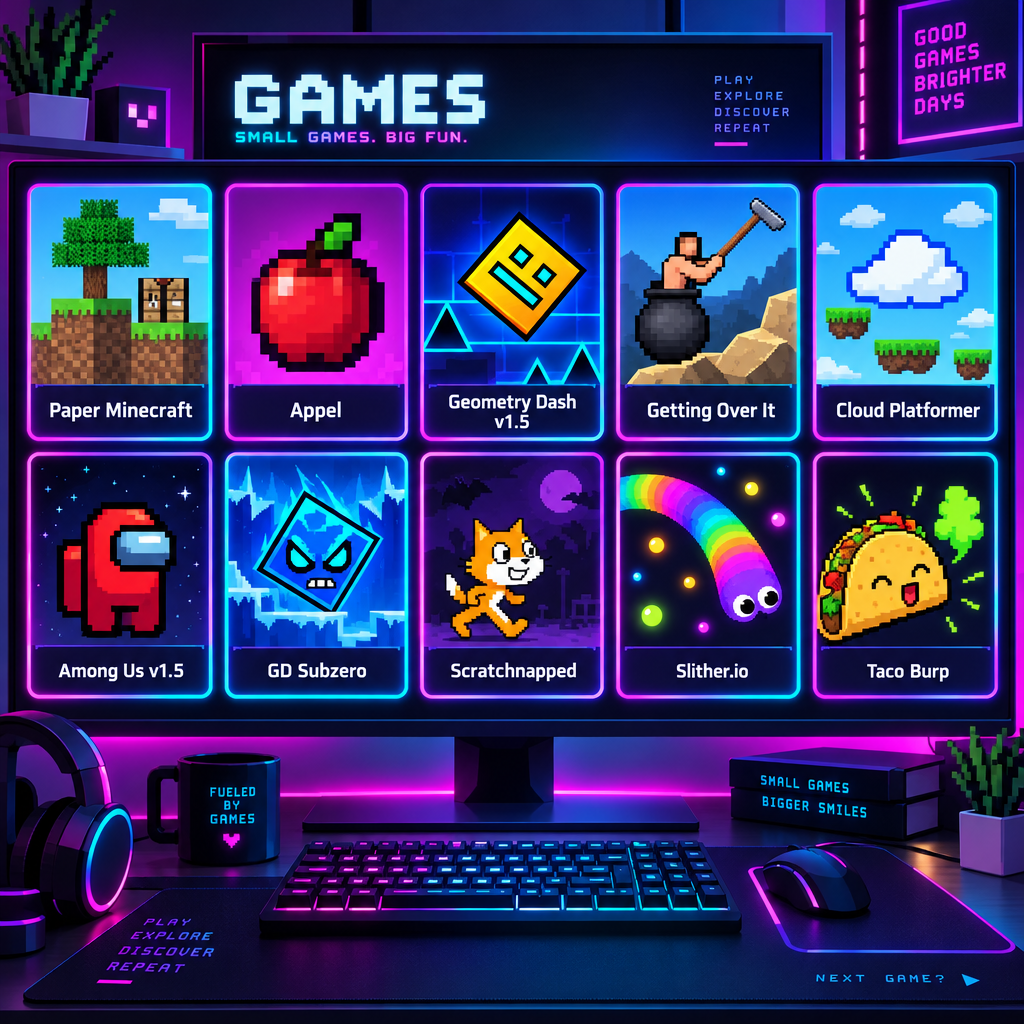
These are the projects that consistently top the Popular tab, get remixed thousands of times, and still get played years after release. Creator usernames are included so you can search them directly.
| Game | Creator | Genre | Why it stands out |
|---|---|---|---|
| Paper Minecraft | griffpatch | 2D survival sandbox | Crafting, mobs, world saves, still updated |
| Appel | griffpatch | Precision platformer | Tight controls, hidden collectibles, fan-made levels |
| Geometry Dash v1.5 | griffpatch | Rhythm platformer | Faithful physics, level editor |
| Getting Over It | griffpatch | Rage physics game | Mouse-only hammer control done right |
| Cloud Platformer Multiplayer Fun | griffpatch | Online platformer | Real-time multiplayer via cloud variables |
| Among Us v1.5 | various creators | Social deduction | Tasks, voting, lobby system |
| Geometry Dash Subzero (and sequels) | CrystalKeeper7 | Rhythm platformer | Modern GD levels recreated |
| Scratchnapped | griffpatch | Action platformer | Scratch Cat as a Mario-style hero |
| Slither.io v1.5 | griffpatch | Arcade multiplayer | Smooth snake movement, AI opponents |
| Taco Burp | griffpatch | Arcade shooter | Fast, silly, perfect for a five-minute break |
1. Paper Minecraft
Paper Minecraft is the project most people mean when they say they played Minecraft at school. It is a side-on survival sandbox with mining, crafting tables, furnaces, farming, animals, hostile mobs, a day and night cycle and the Nether. griffpatch first published it in 2013 on Scratch 2.0 and has kept shipping versioned updates ever since, which is why the title on the project page carries a version number.
The clever part is the save system. Scratch projects cannot write files to your computer, so the game generates a long save code you copy to a text file and paste back in later. Keep that code somewhere safe; losing it means losing your world.
Expect the longest load time on this list. The project pulls hundreds of costume assets before the title screen appears, so give it 20 to 40 seconds on a slow connection before assuming it froze.
2. Appel
Appel landed in 2020 and became the platformer every other Scratch creator tried to copy. You control a small apple through a series of rooms with moving platforms, spikes and a dash move, chasing three hidden collectibles per world. Controls use arrow keys or WASD, and the jump has the kind of forgiving edge detection you expect from a polished indie title.
It looks simple. It is not. The code uses a tile-based collision system that avoids the slowdown older Scratch platformers suffered from, which is why it feels responsive even on a school Chromebook. The remix tree is enormous, and searching “Appel levels” surfaces fan-made worlds of wildly varying difficulty.
3. Geometry Dash v1.5
Robtop’s mobile hit translates surprisingly well to a 480 by 360 stage. griffpatch’s version covers the first three levels, Stereo Madness, Back on Track and Polargeist, and focuses on the cube mode, with physics close enough that practiced GD players can feel the difference between a real jump and a cheap one. Ship and ball modes come from fan remixes rather than griffpatch’s own v1.5 release. The music syncs to the obstacles, which is the whole appeal of the genre.
There is a built-in level editor, and the community has filled studios with thousands of custom levels. Treat anything labelled “demon” or “extreme” as a genuine challenge rather than clickbait.
4. Getting Over It
Bennett Foddy’s cauldron-and-hammer rage game, rebuilt in blocks. You swing a hammer with the mouse to haul a man in a pot up a mountain, and one slip can cost ten minutes of progress. The Scratch version nails the one thing that matters: the hammer physics respond to mouse speed and angle, so climbing is a learned skill rather than luck.
Play this one in fullscreen. The small default stage makes precise mouse arcs harder than they need to be.
5. Cloud Platformer Multiplayer Fun
This is the project that showed what cloud variables can do. You and a handful of other players run through the same platformer levels at the same time, each visible as a named character. Scratch limits every project to 10 cloud variables, each holding only numbers up to 256 digits long, so griffpatch encodes every player’s position and name into those few numeric slots. Reading the code is a lesson in data compression.
Cloud features only work when you are logged in with a full “Scratcher” account rather than a “New Scratcher”. Fresh accounts gain Scratcher status after a couple of weeks of activity, and until then you will see other players but your own position will not sync.
6. Among Us v1.5
Several creators released Among Us recreations during the 2020 Among Us boom, and the most-played v1.5 build is still one of the most popular social deduction games on the platform. Lobbies, tasks, emergency meetings, voting and impostor kills are all there. Because it runs on cloud variables, it suffers the same Scratcher-only limitation as the multiplayer platformer, and lobbies are small by design.
The game is at its best when you organise a group in advance. A classroom or a small Discord voice channel works well, since the in-game text chat is heavily filtered.
7. Geometry Dash recreations by CrystalKeeper7
Where griffpatch’s GD stops at version 1.5 era content, CrystalKeeper7 has spent years recreating newer official levels, starting with Geometry Dash Subzero and expanding into World and main-game stages. The art is pixel-accurate to the originals, and the projects are split into separate uploads to stay under Scratch’s asset size limits.
Search the username rather than the game name. “Geometry Dash” alone returns tens of thousands of results, most of them half-finished remixes.
8. Scratchnapped
An older griffpatch project, and a good example of what Scratch 2.0 era games looked like at their best. Scratch Cat, the platform’s mascot, runs through Mario-style levels with enemies to stomp, secrets to find and boss fights. It is shorter than Appel and easier, which makes it the right first platformer for younger players.
9. Slither.io v1.5
The snake-eats-dots arcade formula with AI opponents instead of live ones. griffpatch’s version is notable for smooth segment movement, which is hard to do in Scratch without the frame rate tanking. It also demonstrates the pen extension well: the snakes are drawn with pen lines rather than hundreds of sprites, which is how it stays under the 300 clone cap.
10. Taco Burp
A fast arcade shooter where you fire tacos at waves of enemies. It is the lightest game on this list and loads in seconds, which makes it the right pick when you want to show someone what Scratch can do without waiting for Paper Minecraft to download its asset pile.
Analyst note
Scratch’s player is locked to 30 fps. Running Appel through TurboWarp with the 60 fps option and interpolation enabled doubles the visual update rate, but speedrun communities for the original project time runs at 30 fps, so submit times from the scratch.mit.edu player only.
The genres that dominate Scratch
The Explore page splits projects into Animations, Art, Games, Music, Stories and Tutorials. Inside Games, a few genres make up most of the traffic.
| Genre | What to search | What to expect |
|---|---|---|
| Platformers | “platformer”, “Appel”, “scrolling platformer” | The single biggest genre; hundreds of new ones daily |
| Clickers and idle | “clicker”, “cookie clicker” | Simple, addictive, often a first project |
| Fan games | “Sans fight”, “FNF”, “FNAF” | Undertale, Friday Night Funkin’ and Five Nights recreations |
| Multiplayer | “cloud multiplayer”, “online” | Needs Scratcher status; small lobbies |
| 3D and pen demos | “3D”, “raycaster”, “pen 3D” | Tech showcases pushing the engine |
| Simulators and tycoons | “tycoon”, “simulator” | Roblox-inspired, variable quality |
| Rhythm | “Geometry Dash”, “FNF” | Music-synced obstacle games |
Platformers rule because Scratch makes them easy to start and hard to master. The “Getting Started” tutorial in the editor’s Tutorials panel walks beginners through a jumping sprite, and the Ideas page (scratch.mit.edu/ideas) offers starter projects you can remix. Most creators’ first shared game is a platformer, which is why the Recent tab is flooded with them.
Fan games are the second pillar. Undertale “Sans fight” recreations number in the tens of thousands, and Friday Night Funkin’ mods exploded in 2021. Quality is all over the place, so sort by Popular and look for projects with high love and favorite counts relative to views.
Pen-based 3D projects are the technical showpieces. Scratch has no 3D support, so creators draw raycasted corridors or wireframe models line by line with the pen extension every frame. They are more tech demo than game, but they attract the most “how did they do this” comments on the site.
Finding games on the Explore and Search pages
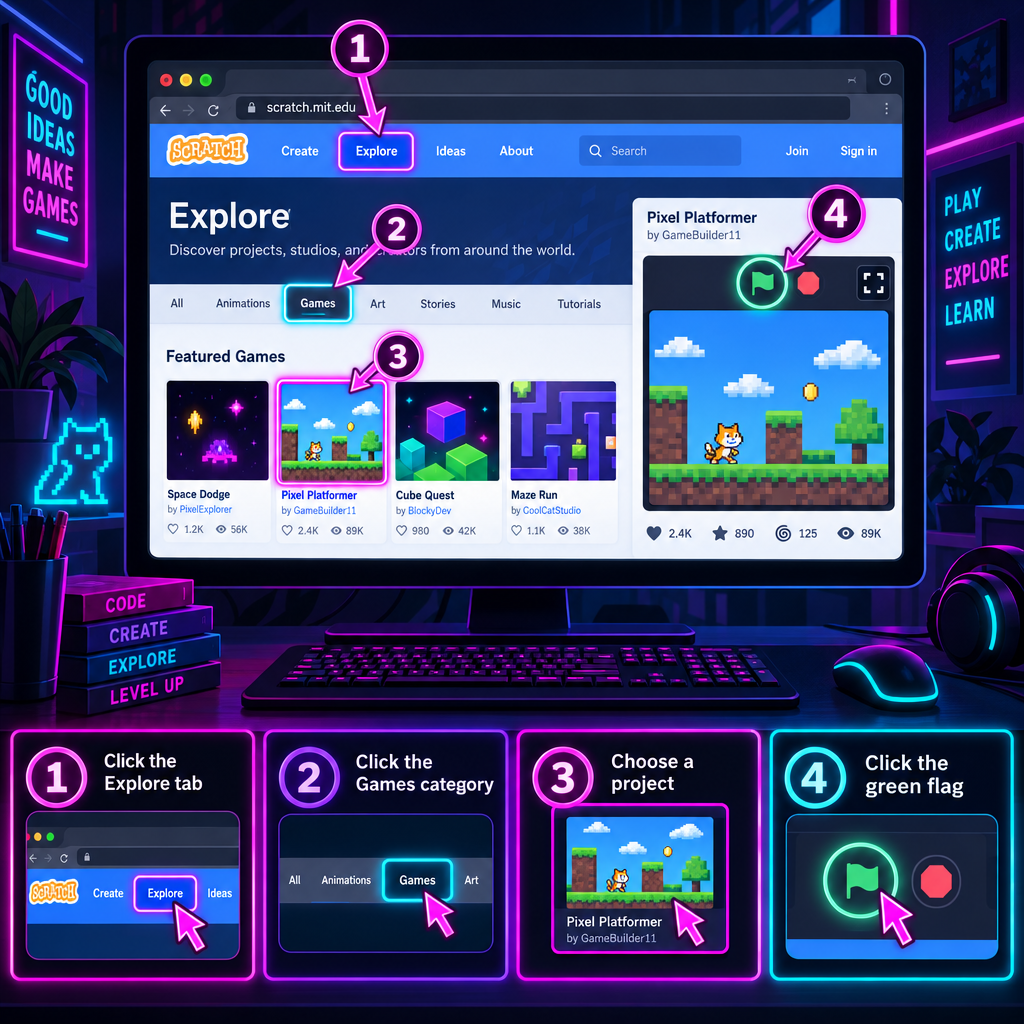
The Explore page is the front door. It has three sort orders: Trending weighs recent loves and views, Popular ranks by all-time engagement, and Recent is a live feed of whatever was shared in the last few minutes. Popular is where the classics live. Trending is where you catch a new hit in its first week.
Search works differently. Type a term in the top bar and you land on a results page with two tabs, Projects and Studios. The Projects tab is active by default. Switching to Studios is the underrated move, because studios are curated collections and a studio named “Best Platformers 2024” with 500 projects inside has already done the filtering for you.
A few search habits that pay off:
- Search a creator’s username to see their whole catalogue rather than one game.
- Add “v1” or a version number to find the original project instead of a remix.
- Use studio names like “Scratch Design Studio” to find the monthly themed showcase the Scratch Team runs.
- Check the remix count on a project page. Thousands of remixes usually means the original is worth playing.
The front page also has rotating rows: Featured Projects (picked by the Scratch Team), What the Community is Remixing, and What the Community is Loving. Featured Projects is the closest thing Scratch has to an editorial recommendation.
Playing faster: Scratch limits versus TurboWarp
Scratch’s player is deliberately conservative so projects behave the same on every machine. TurboWarp is a separate, open-source project that compiles Scratch code to JavaScript and lifts several of those limits. You paste a project ID or URL into turbowarp.org and it loads the same project from Scratch’s servers. It is not a cheat tool, it does not modify your Scratch account, and many creators link it from their own project notes.
| Setting | Scratch player | TurboWarp default | TurboWarp option |
|---|---|---|---|
| Frame rate | 30 fps fixed | 30 fps | 60 fps or custom |
| Interpolation | Off | Off | On (smooths 30 fps logic) |
| Clone limit | 300 | 300 | Infinite clones toggle |
| Pen quality | Standard | Standard | High quality pen |
| Script execution | Interpreted | Compiled | Compiled |
| Stage size | 480 x 360 | 480 x 360 | Custom |
| Cloud variables | Scratcher accounts only | Supported | Supported |
Use TurboWarp when a game stutters, when a 3D pen demo crawls, or when a creator has specifically tuned a project for 60 fps. Use the official Scratch player when a game relies on exact 30 fps timing, when you want to leave a comment or love, and when you are submitting any kind of score or time to a community leaderboard.
Two warnings. Turning on infinite clones or 60 fps can break games that were balanced for the limits, so turn options back off if physics feel wrong. And TurboWarp’s addons that change the editor are convenience features, not performance ones.
Scratch also ships an offline desktop app for Windows, macOS, ChromeOS and Android. It is the same editor without the community features, useful for school networks that block the site or for long sessions where you do not want a browser tab eating memory.
Troubleshooting games that will not load
The most common complaint on the Scratch forums is a blank white stage or a project stuck on a loading bar. Almost every case is one of the causes below.
| Symptom | Likely cause | Fix |
|---|---|---|
| Page says “Please enable JavaScript” | Script blocker or disabled JS | Allow scratch.mit.edu in your browser or extension preferences |
| White stage, no green flag | Unsupported or outdated browser | Update to Chrome 63+, Firefox 57+, Edge 15+ or Safari 11+ |
| Loading bar stalls | Large project, slow connection | Wait 60 seconds; reload once; try TurboWarp |
| Game runs in slow motion | Weak CPU, many clones or pen | Close other tabs; try TurboWarp |
| Keys do nothing | Stage not focused | Click the stage once, then press keys |
| Cloud multiplayer shows no other players | New Scratcher account or logged out | Log in; wait for Scratcher status |
| Sound missing | Browser autoplay policy | Click the stage first, check the site is not muted |
| Project says “disabled” or will not run | Creator unshared it, or it was removed | Search for a remix of the same title |
The JavaScript message trips up more people than anything else. Scratch 3.0 is a JavaScript application, so privacy extensions like NoScript or strict browser settings will block the player entirely. Whitelisting the domain is required; there is no fallback.
School networks are the other big one. Some districts allow scratch.mit.edu but block the asset server the projects load from, which produces an endless loading bar. The offline app sidesteps this.
From player to creator
Every project page has a “See inside” button, and that is where Scratch separates itself from any other free game site. Click it and the editor opens with three tabs: Code, Costumes and Sounds. The Code tab shows every script in the game as colored blocks. The Costumes tab holds the artwork, stored as SVG vector files by default so sprites scale cleanly. The Sounds tab holds the audio, and the Music extension adds instrument blocks if a creator used them.
Click Remix and you get your own editable copy with credit to the original automatically attached. Change a jump height, swap a sprite, add a level. The Scratch community treats remixing as the default way to learn, and griffpatch’s own YouTube tutorials walk through rebuilding several games on this list block by block.
If you want to start from zero instead, the Create button in the top bar opens a blank project. The Tutorials panel on the right side of the editor includes “Getting Started”, “Make a Chase Game”, “Pong Game” and a dozen others. Budget an hour for your first playable thing.
Animations and music projects live alongside games in the same editor, so the skills transfer. Plenty of the best game creators started with animated stories.
Where Scratch players hang out
Scratch’s own community features are built for kids. Comments are filtered, personal contact information is blocked, and the Community Guidelines ask everyone to keep conversations on the site. Discord invite links do not survive the comment filter, and that is intentional.
Discord itself requires users to be at least 13 years old (older in some countries), while Scratch allows younger accounts with a parent’s email. If you are old enough for Discord, there are large unofficial Scratch servers where creators share projects and recruit collaborators. The Scratch Team does not run or endorse any of them, so treat every server as a third-party space.
Running your own server for a Scratch game community is straightforward. A showcase channel with the “Embed Links” permission enabled lets members post project URLs that unfurl with thumbnails. The usual “discord bots for gaming” handle the rest: a leveling bot such as the “mee6 bot” can gate a project-sharing channel behind a few days of activity, which cuts down on drive-by spam from brand-new accounts.
Set Server Settings, then Safety Setup, then Verification Level to at least Medium so members need a verified email and five minutes of account age before posting. Turn on AutoMod’s keyword filter for “free nitro” and “free followers”, because those two phrases cover most of the scams aimed at younger players.
Stay safe
The Scratch Team never asks for your password, and no real project can give you followers or Nitro. Any Scratch project, comment or Discord DM that asks you to log in, enter your password or click an off-site link to claim a reward is a phishing attempt. Report it and move on.
Why these games hold up
Scratch is twice the age of most of the players on it, and the Popular tab is still dominated by projects that are five to ten years old. That is not nostalgia. The engine’s limits force clean design: one screen, keyboard or mouse, 30 frames per second, no microtransactions and no ads. A game that is fun under those constraints is fun, full stop.
Start with Paper Minecraft or Appel. Read the code when you get stuck. Then check the Trending tab, because the next griffpatch is probably twelve years old and uploaded something this week.
FAQ
Are Scratch games really free?
Yes. Scratch is run by a non-profit, carries no advertising and sells nothing. Every shared project is free to play and free to remix under a Creative Commons license.
Do I need an account to play Scratch games?
No. You can play, use fullscreen and look inside any shared project without logging in. An account is only needed to comment, love, favorite, remix, follow creators or use cloud multiplayer.
Can I play Scratch games on my phone?
Partly. Project pages open on mobile browsers, and games with on-screen touch controls work. Anything that needs a keyboard will not. The editor is desktop and tablet only.
Why does the site say “Please enable JavaScript”?
Scratch 3.0 is a JavaScript application, so the player cannot run with scripts blocked. Allow scratch.mit.edu in your browser settings or in any script-blocking extension, then reload.
Is TurboWarp allowed?
TurboWarp is an independent open-source player that loads projects from Scratch’s servers and runs them faster. It is widely used and linked by many creators. It is not a cheat tool, but scores set at 60 fps are not comparable to the 30 fps original.
What is a “scratchy game”?
It is a common misspelling of a Scratch game, meaning a project made with MIT’s Scratch platform. Searching “scratch games” on scratch.mit.edu gets you to the same place.
Why does a multiplayer game show no other players?
Cloud variables, which power multiplayer, only work for logged-in accounts with full Scratcher status. New Scratchers see the game but their data does not sync. Status upgrades automatically after a couple of weeks of activity.